
Likely Dubai’s First M4 WiFi Chip Replacement — One Bad IC, Three Strange Faults
A real component-level repair with a twist. A 14-inch MacBook Pro M4 (A3112) came in after a screen replacement elsewhere with three faults that looked unrelated — no WiFi, random restarts, and a charger cutting on and off. Here is how Dan traced all three to a single overheating WiFi IC, replaced and reprogrammed the chip, and cleared every fault — likely the first M4 WiFi IC replacement done in Dubai.
Component-level repair · Genuine-grade parts · 380+ reviews
Done by Dan's bench · Free pickup & delivery across Dubai
The Quick Answer
A 14-inch MacBook Pro M4 (A3112) came in with three problems after a screen replacement at another shop: no WiFi, random restarts that sometimes stopped it even reaching the login screen, and a charger that kept cutting on and off. The cause was a single overheating WiFi IC, which had been damaged during that screen job and was dragging down the rails it shares. MacTech Pro replaced and reprogrammed the WiFi chip, and all three faults were gone. Likely the first M4 WiFi IC replacement done in Dubai.
Three faults after a screen job elsewhere
A 14-inch MacBook Pro M4 (A3112) landed on the bench in a bad way — and it all started with a screen replacement somewhere else.
After that other shop swapped the screen, the WiFi IC got blasted. Here’s what the customer was actually living with:
- No WiFi at all. The Mac simply wouldn’t connect.
- Random restarts. Sometimes it wouldn’t even stay on long enough to log in.
- Charging that flapped on and off. The charger kept cutting in and out, never settling.
Three symptoms that look completely unrelated. They weren’t.
One chip, three faults
On diagnosis, the WiFi chip was overheating — and a chip that’s shorting and cooking itself doesn’t just kill WiFi.
It drags down the power rails it shares with the rest of the board, and that’s what was throwing the Mac into restart loops and confusing the charging into switching on and off. One failed component, three different headaches.
How one chip caused three faults
Shared power rails
On a dense logic board, components share power rails. When one chip shorts and overheats, it pulls those shared rails out of spec, so other circuits that depend on them — nothing to do with WiFi — start misbehaving too.
Why the symptoms looked unrelated
To the user it looked like three separate problems: a network fault, a stability fault and a charging fault. Under the microscope it was one cause — which is exactly why part-swapping by symptom fails and a proper board-level diagnosis succeeds.
Getting the part for a brand-new chip
There was one real challenge here, and it wasn’t the soldering.
The M4 is new enough that the WiFi IC itself is genuinely hard to get hold of. Big thanks to Master Liu and the team at LBTool for getting us the M4 WiFi IC and the programming dongle so quickly. Without that kind of support from the wider repair community, a job like this waits weeks for parts.
Out with the old, in with the new
With the part in hand, the repair itself was precise.
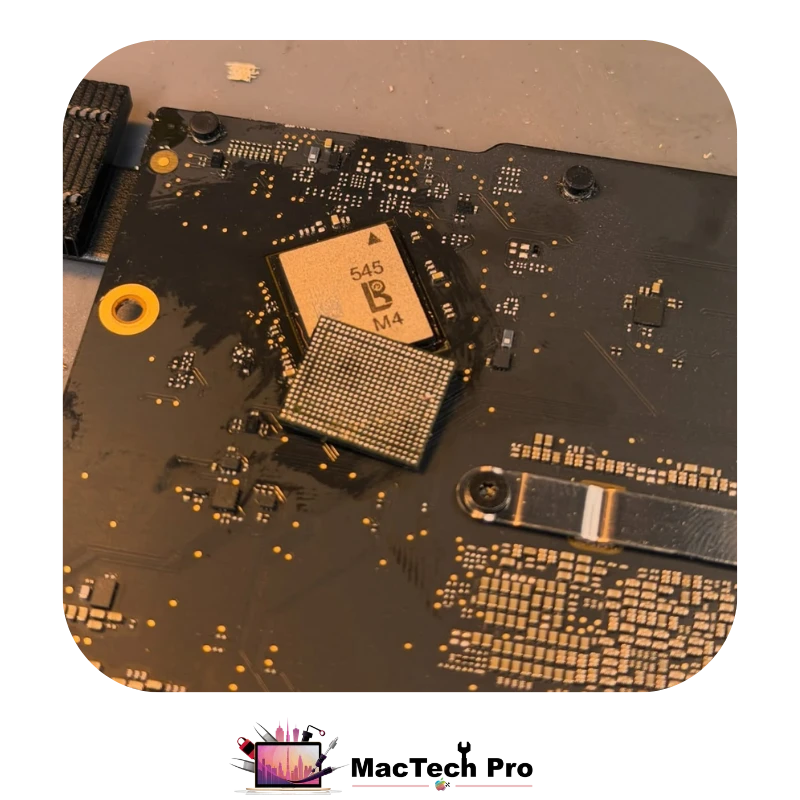
We removed the overheating WiFi chip, fitted the new IC, and reprogrammed it — these chips have to be programmed correctly after fitting, not just soldered on.
The fix, step by step
1. Remove the overheating chip
The failed WiFi IC is carefully micro-soldered off the logic board without disturbing the components packed around it.
2. Fit the new WiFi IC
The replacement M4 WiFi IC is aligned and micro-soldered into place on the original board.
3. Program the new chip
The new IC is then programmed with the correct data using the dongle — the step most part-swappers skip, and the reason a chip that’s only soldered on still won’t give you working WiFi.
Three problems, all gone
With that done, the Mac came back to life.
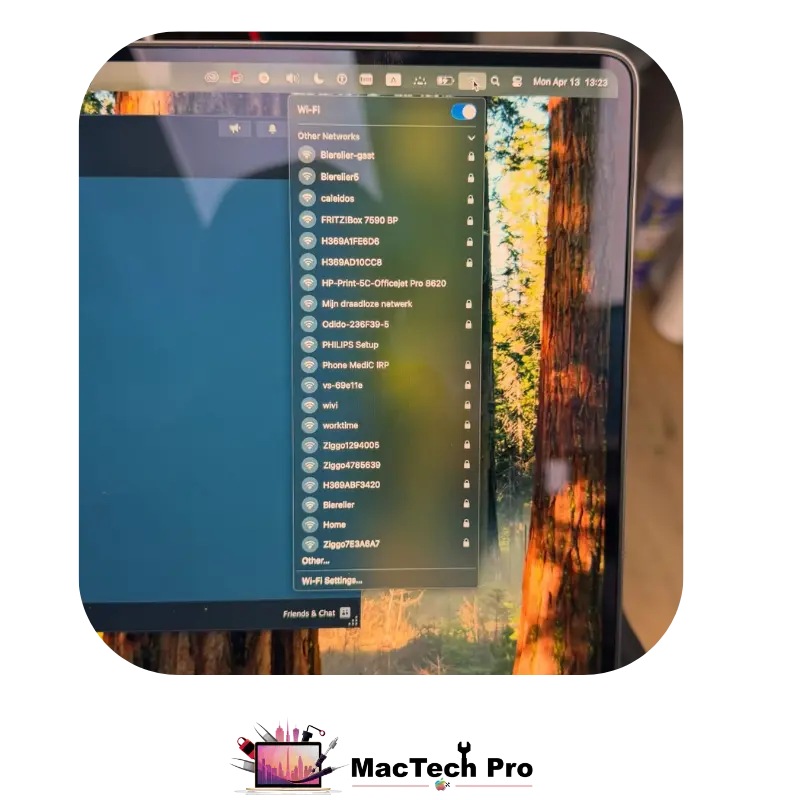
WiFi working. No more restarts. Charging steady and reliable. All three problems traced back to that one chip — and all three gone.
When odd symptoms share one cause
A screen replacement done carelessly elsewhere caused every bit of this.
When a Mac starts showing a mix of odd symptoms after a repair — no WiFi, restarts, charging trouble — it’s very often a single board-level fault behind all of it, not three separate problems. The fix is a proper diagnosis under the microscope, not swapping parts and hoping. A screen replacement done properly doesn’t leave damage like this behind — and if your Mac is behaving this way after a repair, bring it to MacTech Pro.
One chip vs a whole new board
The instinct on a board-level fault is often ‘you need a new logic board.’ For a single failed chip, that’s rarely true.
The WiFi IC can be replaced on its own at component level and then reprogrammed — no full board swap needed. Replacing one chip costs a fraction of a whole board and keeps your original board and your data. A board swap is the easy option for a shop, but it’s the expensive one for you, and on these machines it takes your storage with it.
Why the new chip must be programmed
One detail separates a WiFi IC repair that works from one that doesn’t.
Why the new chip must be programmed
A replacement MacBook WiFi chip isn’t just soldered on — it has to be programmed correctly after fitting for WiFi to work properly. Skip that step and the chip is physically in place but functionally dead. Doing it right needs the correct programming dongle and data, which is part of why brand-new models like the M4 are harder to repair until that support reaches the wider repair network.
Lost WiFi after a repair? What to know
If your MacBook lost WiFi or started misbehaving right after a repair elsewhere, a few things are worth knowing.
WiFi that dies immediately after a screen replacement is a red flag — careless handling during a display swap can damage the WiFi IC or the antenna lines that run up into the lid. The same goes for new restarts or charging trouble that appear straight after a repair. None of it is normal, and none of it is necessarily your Mac ‘wearing out’ — it’s worth a board-level check to find what was disturbed.
The technician behind this repair
This repair was carried out by Dan, our lead technician and logic board repair specialist.
Component-level work like this — reading shared power rails, finding the one chip dragging everything else down, micro-soldering a tiny WiFi IC and programming it correctly — is exactly the kind of repair most shops can’t attempt, which is why a brand-new M4 fault like this is something we can take on rather than turn away. Dan leads our logic board and micro-soldering repairs; our screen and display side is run by Richard — and yes, a screen job done by a specialist is exactly how you avoid the damage that caused this case.
WiFi & board faults we repair
This WiFi IC fault is one of many board-level problems we trace and repair. If your Mac shows any of these, especially after another repair, it’s worth a board diagnosis.
No WiFi / weak WiFi
A failed WiFi IC or damaged antenna lines, repaired at component level.
Random restarts
Power instability from a shorted or overheating component, traced and fixed.
Charger cutting on and off
A short on a shared rail confusing charging, repaired at the chip level.
Faults after another repair
Damage left behind by a careless screen or part swap elsewhere.
Overheating chips
Components cooking themselves and dragging the board down, replaced.
Brand-new model repairs
Component-level work on the newest Macs, with parts via the repair network.
MacBook WiFi & board repair in Dubai
MacTech Pro is an independent Apple-device specialist in Dubai Sports City. We provide component-level MacBook board repair, WiFi IC replacement and data recovery in Dubai, with a No Fix, No Fee policy.
Every board-level job starts with an honest diagnosis under the microscope: we find the real fault — the one chip or rail behind the symptoms — and tell you whether it’s a chip-level repair or something bigger before any work begins, at a fixed price you approve first. Pickup and delivery across Dubai is free, or you’re welcome to visit our Dubai Sports City service centre. If we can’t fix it, you don’t pay.
Why bring it to MacTech Pro
- We repair the board at component level, not just swap it. On the M1, M1 Pro and M1 Max, a single failed component is usually the whole fault. Repairing that part is cheaper than a board swap and keeps your storage and data intact.
- Free, honest diagnosis and a fixed price first. You see the real fault and the real cost before any work. No fix, no fee.
- Genuine or OEM-grade parts, fitted and tested. That matters more on these models, where the mini-LED display and large batteries are expensive to get wrong.
- Work done by Dan's bench. Power-rail diagnosis and micro-soldering on Apple Silicon by one of Dubai's more experienced technicians, with 380+ reviews behind the shop.
- Your data comes first. These are pro machines, and we treat the data on them as the priority on every board and liquid job.
- Free pickup and delivery across Dubai, secure courier to the rest of the UAE, and a 3-month warranty on the repair.
Who does the work
Dan
Dan runs the bench at MacTech Pro and handles the board-level work himself: power-rail diagnosis, micro-soldering and data recovery on Apple Silicon Macs, including the M1, M1 Pro and M1 Max MacBook Pro. If another shop has told you the board is dead or the repair isn't possible, he's usually the one who proves otherwise. Every repair described here is carried out or checked by his team. Meet the technician →
Serving all of Dubai
Searching for MacBook WiFi IC replacement and board repair “near me”? MacTech Pro collects and delivers free across Dubai, and ships securely UAE-wide. Areas we regularly cover:
More from MacTech Pro
MacBook WiFi IC & board faults — frequently asked questions
Yes. A chip that has shorted or is overheating doesn’t only affect its own job, it drags down the power rails it shares with the rest of the board. That’s how a single failing WiFi IC can cause no WiFi, restart loops, and a charger that cuts on and off, all at once, as it did in this repair.
Very possibly. Careless handling during a display swap can damage the WiFi IC or the antenna lines that run up into the lid. If your WiFi died right after a screen replacement, it’s worth having the board checked, that’s exactly what happened here.
It can be replaced on its own at component level, and then reprogrammed, no full board swap needed. Replacing one chip costs a fraction of a whole board and keeps your original board and data.
A shorted or overheating component can destabilise the board’s power and throw the Mac into restart loops before it ever reaches the desktop. It looks like a software problem, but it’s often a hardware fault, found with a proper board-level diagnosis.
A short on a shared power rail can confuse the charging negotiation, so the charger keeps cutting in and out instead of settling. Fixing the faulty component, the overheating WiFi chip in this case, restores steady charging.
Yes. These chips aren’t just soldered on, they have to be programmed correctly after fitting for WiFi to work properly. We program the new IC as part of the repair.
Yes. The main challenge with a brand-new model is parts availability, which we handle through the wider professional repair network. The board-level work itself, like this WiFi IC replacement, is very much possible.
The A3112 is the 14-inch MacBook Pro with the base M4 chip, released in 2024.