
MacBook Air M1 C-Type Port Replacement in Dubai
A USB-C port that won't read devices, won't drive an external display, or feels loose. We test the port and the controller behind it on your Air M1.
Component-level repair · Genuine-grade parts · 380+ reviews
Done by Dan's bench · Free pickup & delivery across Dubai
The Quick Answer
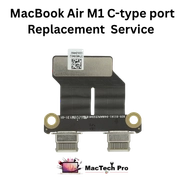
The MacBook Air M1 (A2337) has two USB-C ports that handle charging, data and external displays. When one stops working for data or display, it's often the port or its flex; when both fail, the USB-C controller on the board is the likely cause. MacTech Pro tests the port and the controller with a USB-C analyser, then repairs the port or the board path as needed. Free diagnosis, 3-month warranty.
The USB-C ports on the Air M1 do everything: power, data, and video out. So when one misbehaves, the symptom depends on what you were using it for. No charging, no external monitor, or a drive that won't mount can all trace back to the same port, or to the controller that runs it on the board.
The number of affected ports is a useful clue. One dead port is usually that port or its flex cable. Both ports failing at once points to the board's USB-C controller. We test with a USB-C analyser so we repair the actual fault rather than swapping a port that was fine.
Signs your Air M1 needs this
USB-C port symptoms we diagnose:
How MacTech Pro handles it
Test the port
We check the USB-C port for wear and damage and test it with known-good cables and devices.
Test the controller
Using a USB-C analyser we check the port controller and the board's USB-C circuit.
Repair the fault
We replace the port or its flex, or repair the controller on the board, depending on what failed.
Verify data, display and charge
We confirm data, external display and charging all work through the port before returning it.
One port or both?
If only one of the two USB-C ports is dead, it's usually the port or its flex. If both have failed, the board's USB-C controller is the more likely cause, which is component-level work. We test to be sure rather than guessing. Charging-only issues are covered on our charging port page.
Why bring it to MacTech Pro
- We repair the component, not just swap the board. On the A2337 a single failed chip or capacitor is usually the whole problem. Fixing that part is cheaper than a board swap, and it keeps your storage and data intact.
- Free, honest diagnosis and a fixed price first. You see the real fault and the real cost before we touch anything. If you decide not to go ahead, you pay nothing.
- Genuine or OEM-grade parts, fitted and tested. No mystery parts, and we test the repair properly before it leaves the bench.
- Work done by Dan's bench. Board-level diagnosis and micro-soldering by one of Dubai's more experienced Apple technicians, with 380+ reviews behind the shop.
- Your data comes first. Especially on logic-board and liquid jobs, we protect what's on the machine before anything else.
- Free pickup and delivery across Dubai. Secure courier to the rest of the UAE, and a 3-month warranty on the repair.
Who does the work
Dan
Dan runs the bench at MacTech Pro and does the board-level work himself: power-rail diagnosis, micro-soldering and data recovery on Apple Silicon Macs like the Air M1. If another shop has told you your Mac can't be fixed, he's usually the one who proves otherwise. Every repair described on this page is carried out or checked by his team. Meet the technician →
Serving all of Dubai
Searching for this repair “near me”? MacTech Pro collects and delivers free across Dubai, and ships securely UAE-wide. Areas we regularly cover:
Related Air M1 services
USB-C Port — frequently asked questions
They're the same physical USB-C ports. This page covers data and external-display faults; if your only issue is charging, the charging port page is the better fit. We diagnose both the same way.
A single dead port is usually that port or its flex cable. We test it to confirm, since the fix is focused and often same-day.
Likely. When both USB-C ports fail together, the controller on the board is the usual cause, which is component-level repair. We confirm with proper testing.
We quote a fixed price after the free diagnosis. Port repairs are usually same-day; board-level work can take longer. Pickup and delivery in Dubai is free.