
MacBook A2681 Cracked Screen Repair — LCD Panel Only, No Full Assembly
A real repair, start to finish. A 13-inch MacBook Air M2 (model A2681) arrived with a cracked screen — it still lit up, but the picture was buried under colour lines. Here is how Richard, who heads our screen department, fixed it by replacing only the LCD panel, not the whole display assembly, on a dust-controlled bench, kept True Tone working, and saved the customer the cost of a full assembly. No Fix, No Fee.
Component-level repair · Genuine-grade parts · 380+ reviews
Done by Dan's bench · Free pickup & delivery across Dubai
The Quick Answer
Yes, a cracked MacBook screen can often be fixed by replacing only the LCD panel, not the whole display assembly. On this 13-inch MacBook Air M2 (A2681), the lid, hinges, housing, camera area and backlight were all in good condition, so MacTech Pro replaced just the cracked LCD panel on a dust-controlled bench, kept True Tone working, and saved the customer the cost of a full assembly. No Fix, No Fee.
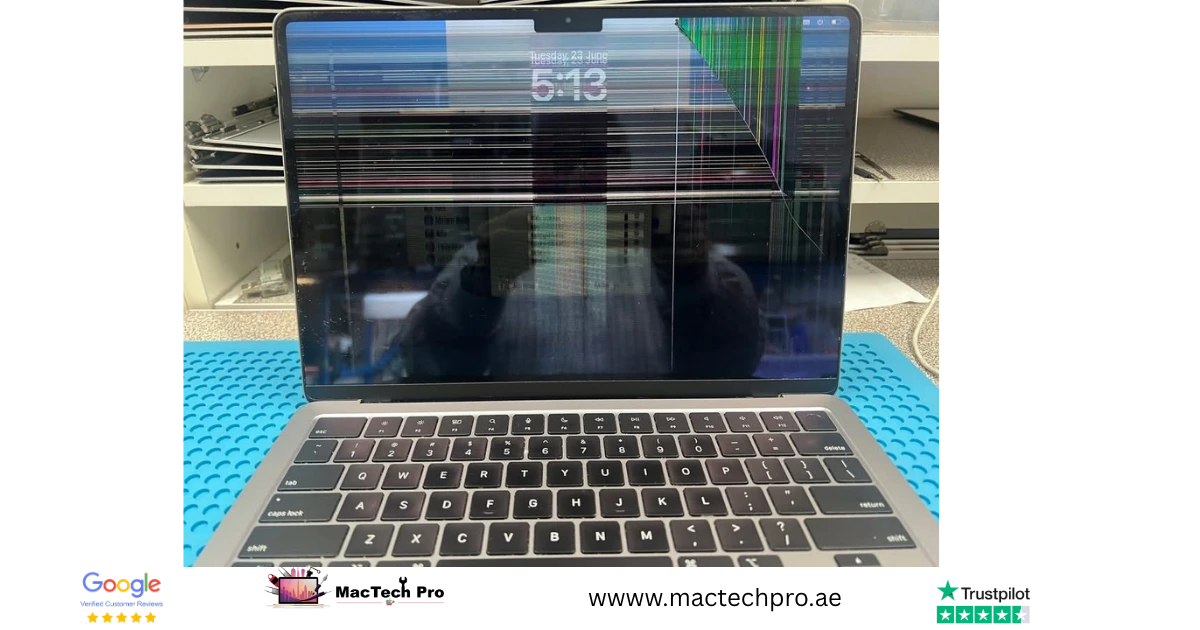
A cracked screen that still lit up
A 13-inch MacBook Air M2 (model A2681) came in with a cracked screen. It still lit up and showed a picture, but the image was buried under colour lines and distortion — the classic sign of a cracked LCD panel with the backlight still working behind it.
Reading the symptoms
When a MacBook screen shows colour lines, bands or blotches but still glows, it tells an experienced eye a clear story: the panel itself is damaged, while the backlight behind it is still alive. The Mac is still generating the image — the broken panel is just distorting it on the way to your eyes. That single observation is what makes a panel-only repair possible, because it means the light source and the rest of the display are likely intact.
What a cracked LCD looks like
Vertical or diagonal coloured lines, rainbow bands, spreading ink-like blotches, or a shattered area that still shows light behind it — all point to a cracked LCD panel rather than a dead display. We confirmed exactly this on the A2681 before quoting anything.
Cracked panel, or a dead display?
Before quoting any screen repair, the first question we answer is simple: is the panel cracked, or is the display actually dead?
Cracked panel vs dead display
Cracked LCD panel — still lit
The screen still glows and the backlight works, but the image is broken up by colour lines, bands or blotches. The Mac is generating the picture; the damaged panel is distorting it. This is exactly what we found on the A2681 — and it’s the case where a panel-only repair usually applies.
Dead or black display — no image
The screen stays dark even though the Mac is clearly on — you hear the start-up chime, see the keyboard light, or it shows on an external monitor. That can point to the backlight, the display cable or the assembly rather than just the panel, so the fix may be different. We diagnose which it is before recommending anything.
Getting this right up front is the whole point: it’s how we avoid quoting a full assembly for a screen that only needs a panel, and how we avoid promising a panel-only fix for damage that actually needs more.
Why this didn’t need a full assembly
Here is the part that saved this customer money: the screen did not need a whole new display assembly. The lid, hinges and housing were all sound, and the camera and antenna area were untouched. So we left all of that in place and replaced only the broken LCD panel.
Assembly vs panel — what is the difference?
A full display assembly is the entire lid: the housing, hinges, antennas, camera, the backlight layers and the LCD panel, all bonded together as one unit. The LCD panel is just one layer inside that. When only the panel is cracked and everything around it is fine, replacing the whole assembly means paying for a lot of good parts you do not need. Replacing only the panel keeps all the healthy parts and swaps just the broken one.
Panel out, new panel in — step by step
That sounds simple. It isn’t.
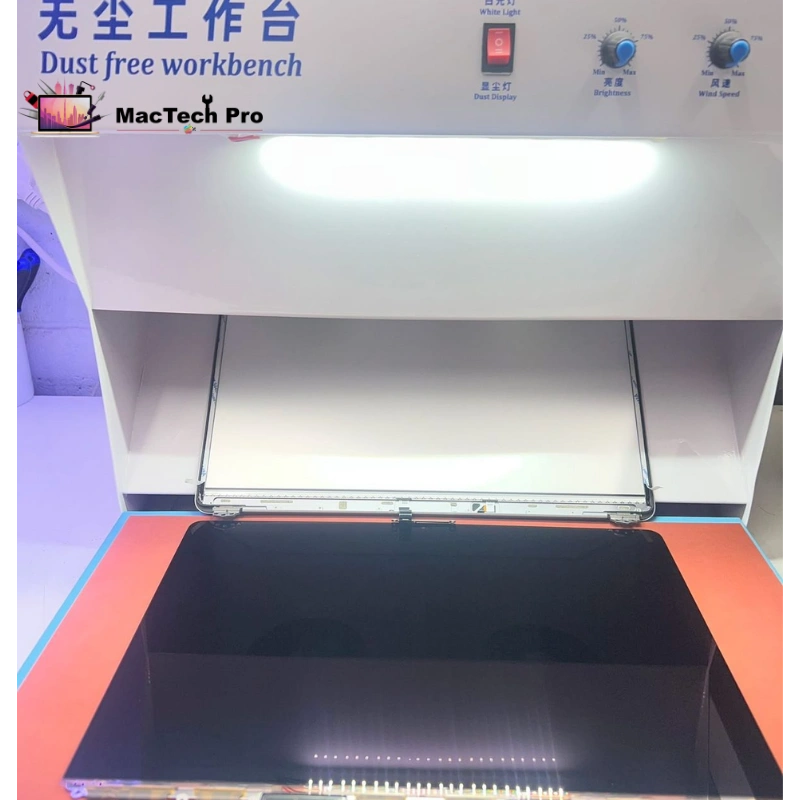
The panel is bonded to the assembly, so it has to be separated cleanly without nicking the flex cables or disturbing the optical layers beneath. Any speck of dust trapped between the panel and the backlight shows up the moment the screen turns on — which is exactly why this job belongs on a dust-controlled bench, not a kitchen table. We transferred the original cables, seated the new panel, aligned it so it sat flush in the frame, and confirmed True Tone was still working before it went back to the customer.
The repair, step by step
1. Separate the bonded panel
The cracked panel is carefully released from the assembly under controlled conditions, protecting the flex cables and the optical layers underneath.
2. Transfer the original cables
The original display cables are moved across to the new panel, keeping the assembly’s own wiring intact.
3. Seat and align the new panel
The new LCD panel is fitted and aligned so it sits perfectly flush in the frame, with no dust trapped between it and the backlight.
4. Confirm True Tone and test
With the panel in, True Tone is checked and the display is tested end to end. New panel in, the display was back to normal — clean, bright, no lines.
Not every cracked screen needs a full assembly
The takeaway worth remembering: not every cracked MacBook screen needs a full assembly.
When the lid, frame, camera area and backlight layers are all in good condition, replacing just the LCD panel is often the smarter and cheaper fix. When they’re damaged too, a full assembly is the honest call — and we’ll tell you which one your machine actually needs before we touch it.
What makes an LCD-panel-only repair possible
This is what we look for before recommending an LCD-panel-only repair. On the A2681, all four were true.
What makes an LCD-panel-only repair possible
Intact lid and hinges
The display housing and hinges are reused, not replaced — so you’re not paying for parts that are perfectly fine.
Undamaged camera and antenna area
No need to disturb the top of the lid, where the camera and Wi-Fi antennas live.
Working backlight layers
The light source behind the panel is sound, so only the cracked panel is swapped — the reason the screen still glowed despite the damage.
A clean, aligned fit
Done on a dust-free bench with careful separation and correct alignment, so the finished screen looks factory-clean.
The case for a dust-controlled repair
Why does this job belong on a proper bench rather than a kitchen table? Because of what sits directly behind the panel.
The LCD panel sits right in front of the backlight layers. Any dust trapped between them becomes visible the moment the screen lights up — as specks, shadows or hazy patches that no amount of cleaning from the outside will remove. The work has to be done in a dust-controlled environment, with careful separation of the bonded panel and correct alignment of the new one. That is the difference between a screen that looks factory-fresh and one that is quietly ruined by a single particle.
Smart display features, preserved
One thing customers worry about with screen work on a modern Mac: will the smart display features still work?
Yes. When the panel is replaced and set up correctly, True Tone continues to work as normal — as it did on this A2681 repair. True Tone subtly adjusts the display’s colour to match the light around you, and keeping it working is part of doing the job properly, not an optional extra.
Clean, bright, no lines
The outcome for this customer was the best of both worlds: the screen looked and behaved like new, and the bill was a fraction of a full assembly.
New panel in, the display was back to normal — clean, bright, no colour lines, with True Tone working. Because the lid, camera and backlight were all reused, the customer paid for one part instead of a whole assembly. That is the value of diagnosing honestly first: the right repair, not the most expensive one.
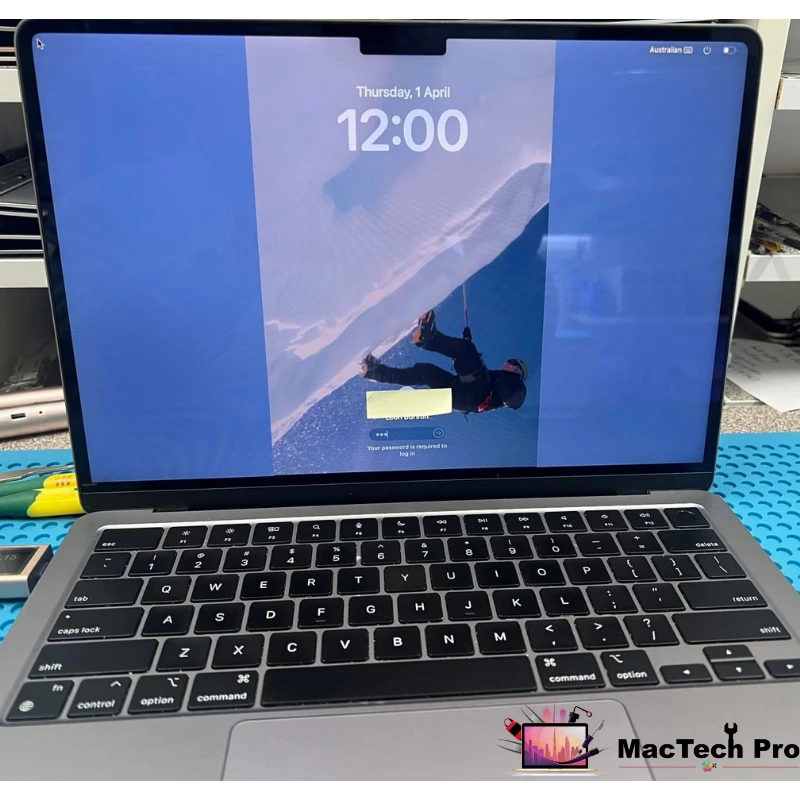
The MacBook Air M2 (A2681) in this repair
The machine in this case study is the 13-inch MacBook Air with the M2 chip — Apple’s model A2681, released in 2022.
Why the model matters for a screen repair
The A2681 uses a Liquid Retina display with a notch at the top for the camera, built as a thin, bonded panel assembly. Knowing the exact model tells us which panel fits, how the display is constructed, and where the camera and antennas sit — all of which decide whether a panel-only repair is possible. It’s also why we confirm the model, often from the A-number on the underside, before sourcing any part.
If you’re not sure which MacBook you have, we’ll identify it for you at the free diagnosis. The A2681 is one of the most common MacBook Airs we see for screen work, so panel-only repairs on this model are routine for us.
The technician behind this repair
I’m Richard, and I head the screen and display department here at MacTech Pro. This A2681 was my repair from start to finish — the diagnosis, separating and swapping the LCD panel on the dust-controlled bench, and the final True Tone check before it went back to the customer.
Display work is its own craft: releasing a bonded panel without nicking the flex cables, keeping the optical stack spotless, and getting the alignment exactly right so the new screen sits flush and clean. It’s what I do every day, which is why a panel-only job like this one is routine for me rather than a gamble. And when a screen needs more than a panel — a cracked lid, worn hinges or a dead backlight — I’ll tell you straight rather than sell you parts you don’t need.
For anything beyond the screen, my colleague Dan leads our logic board repair and data recovery, so whatever your MacBook needs, it’s matched to the right specialist in-house.
— Richard, Head of Screen & Display Repair, MacTech Pro
MacBook screen problems we fix
A cracked LCD with colour lines is one of several screen faults we repair. If your MacBook shows any of these, we can help.
Coloured lines / bands
A cracked LCD panel with the backlight still on. Often a panel-only fix.
Cracked or shattered glass
Physical screen damage. Panel-only where possible, full assembly if needed.
Black screen, backlight dead
Screen stays dark though the Mac is on. Diagnosed and repaired.
Flickering / display cable
Flicker or cut-out from a display cable or connection fault.
Spots, shadows or pressure marks
Blemishes in the panel or trapped debris behind it.
Any MacBook Air or Pro
Screen and LCD work across Intel and Apple Silicon models.
Your screen repair, step by step
Free screen diagnosis
We confirm whether it’s a cracked LCD panel or full assembly damage, and identify exactly what your MacBook needs — at no charge.
Honest, fixed quote
We explain panel-only vs full assembly for your machine, with a clear fixed price. Work starts only once you approve.
Dust-controlled repair
Richard separates the bonded panel, transfers the cables, seats and aligns the new panel, and confirms True Tone — on a dust-free bench.
Tested & returned
We test the display end to end and return your MacBook with a warranty, by free delivery or for collection.
MacBook screen repair in Dubai
MacTech Pro is an independent Apple-device specialist in Dubai Sports City. We provide MacBook screen and LCD panel replacement, logic board repair and data recovery in Dubai, with a No Fix, No Fee policy.
Every screen repair starts with an honest diagnosis: we tell you whether your MacBook needs a panel-only repair or a full assembly before any work begins, and we quote a fixed price you approve first. Pickup and delivery across Dubai is free, or you’re welcome to visit our Dubai Sports City service centre. If we can’t fix it, you don’t pay.
Protecting your repaired screen
Once your MacBook screen is repaired, a few simple habits keep it that way.
Looking after a repaired MacBook screen
Close the lid with nothing on the keyboard — even a thin cable or a pair of earbuds can crack a panel when the lid shuts on them. Lift and carry the MacBook by its base, not by the screen, and avoid pressing or poking the display. Use a padded sleeve inside your bag rather than letting the laptop knock against chargers, keys or hard objects. And keep drinks well clear, since spills are one of the most common causes of both screen and logic-board damage.
These are the same habits that would have prevented most of the cracked screens we see — but accidents happen, and when they do, an honest panel-only repair is here when you need it.
Why bring it to MacTech Pro
- We repair the board at component level, not just swap it. On the M1, M1 Pro and M1 Max, a single failed component is usually the whole fault. Repairing that part is cheaper than a board swap and keeps your storage and data intact.
- Free, honest diagnosis and a fixed price first. You see the real fault and the real cost before any work. No fix, no fee.
- Genuine or OEM-grade parts, fitted and tested. That matters more on these models, where the mini-LED display and large batteries are expensive to get wrong.
- Work done by Dan's bench. Power-rail diagnosis and micro-soldering on Apple Silicon by one of Dubai's more experienced technicians, with 380+ reviews behind the shop.
- Your data comes first. These are pro machines, and we treat the data on them as the priority on every board and liquid job.
- Free pickup and delivery across Dubai, secure courier to the rest of the UAE, and a 3-month warranty on the repair.
Who does the work
Dan
Dan runs the bench at MacTech Pro and handles the board-level work himself: power-rail diagnosis, micro-soldering and data recovery on Apple Silicon Macs, including the M1, M1 Pro and M1 Max MacBook Pro. If another shop has told you the board is dead or the repair isn't possible, he's usually the one who proves otherwise. Every repair described here is carried out or checked by his team. Meet the technician →
Serving all of Dubai
Searching for MacBook screen repair “near me”? MacTech Pro collects and delivers free across Dubai, and ships securely UAE-wide. Areas we regularly cover:
More from MacTech Pro
Cracked MacBook screen — frequently asked questions
Often, yes. If the lid, hinges, display housing, camera area and backlight layers are still in good condition, only the cracked LCD panel needs replacing, not the entire display assembly. This is usually the more cost-effective repair. When those parts are damaged too, a full assembly is the right call.
That’s the classic sign of a cracked LCD panel with the backlight still working behind it. The image is still generated, but the damaged panel distorts it. In many cases this can be fixed by replacing the LCD panel on its own.
The A2681 is the 13-inch MacBook Air with the M2 chip, released in 2022.
Usually, yes. Reusing the existing lid, hinges, camera and housing avoids paying for a complete assembly, so it’s generally the more affordable option when those parts are undamaged.
The panel sits directly in front of the backlight layers, so any dust trapped between them becomes visible the moment the screen lights up. The work has to be done in a dust-controlled environment, with careful separation of the bonded panel and correct alignment of the new one.
Yes. When the panel is replaced and set up correctly, True Tone continues to work as normal, as it did on this A2681 repair.
Yes. MacTech Pro provides MacBook screen and LCD panel replacement, logic board repair and data recovery in Dubai, with a No Fix, No Fee policy.
Our screen and display department is run by Richard, who carried out this A2681 LCD panel replacement and handles MacBook screen and LCD panel repairs day to day. Our lead technician, Dan, covers logic board repair and data recovery, so every MacBook is matched to the right specialist in-house.
It depends on the model and parts on hand, but a panel-only repair is typically a same-day or next-day job once the correct panel is ready. We give you a realistic timeframe with your fixed quote.
Done correctly, yes — you get the same display quality, because the only part being changed is the panel itself. The lid, camera and backlight that are reused are the parts that were already in perfect condition.
On a panel-only repair the camera area is left untouched, so it’s unaffected. Touch ID on the MacBook Air M2 is in the keyboard, not the screen, so it isn’t involved in a screen repair at all.
Yes. If the screen is dark with no image, the damage may extend to the backlight or assembly rather than just the panel. We diagnose exactly what’s wrong and tell you honestly whether it’s a panel-only repair or a full assembly.
Then a panel-only repair isn’t the right fix, and we’ll tell you so. When the housing, hinges or camera area are damaged, a full display assembly is the honest call. We always recommend the repair your machine actually needs, not the most expensive one.
Yes. We fit quality panels matched to your model so the finished screen looks and performs as it should, with True Tone preserved. We’ll talk you through the options for your MacBook at the diagnosis.
Yes. We collect your MacBook from anywhere in Dubai, carry out the screen or LCD panel repair, and return it free of charge. You’re also welcome to visit our Dubai Sports City service centre.
Yes. Our screen and LCD panel repairs come with a warranty covering the work and the panel fitted, plus our No Fix, No Fee promise — if we can’t fix it, you don’t pay.
Very likely yes. Colour lines after a drop, with the screen still lit, are the classic cracked-LCD symptom we fixed on this exact A2681. Bring it in for a free diagnosis and we’ll confirm whether a panel-only repair will sort it.
Yes. We replace screens and LCD panels across MacBook Air and MacBook Pro models, both Intel and Apple Silicon. The A2681 is the model in this case study, but the same careful, dust-controlled approach applies to whichever MacBook you have.
Yes, and that’s actually good news. If the Mac drives an external monitor perfectly, the logic board and graphics are fine and the problem is isolated to the built-in display, which is exactly the situation where a panel-only repair often applies. We’ll confirm it at the diagnosis.