
M5 MacBook Pro Liquid Damage Repair — Data Saved, No Board Swap
Don’t wait — with liquid damage, speed is everything. A few-months-old 14-inch MacBook Pro (M5, A3434) came in completely dead after a spill, with an Apple quote of AED 5,500+ for a full board replacement that would have wiped the data. Here is how Dan found the corrosion had reached just three capacitors, cleaned the board ultrasonically, replaced the three caps, and had it working again — every file intact — in two days. No board swap. No data loss.
Component-level repair · Genuine-grade parts · 380+ reviews
Done by Dan's bench · Free pickup & delivery across Dubai
The Quick Answer
A few-months-old 14-inch MacBook Pro (M5, A3434) came in completely dead after a liquid spill, with an Apple quote of AED 5,500+ for a full board replacement that would have wiped the data. MacTech Pro found the corrosion had only reached three capacitors, cleaned the board with an ultrasonic machine, replaced the three caps, and the Mac was working again — with all the customer’s files intact — back in two days. With liquid damage, speed is everything.
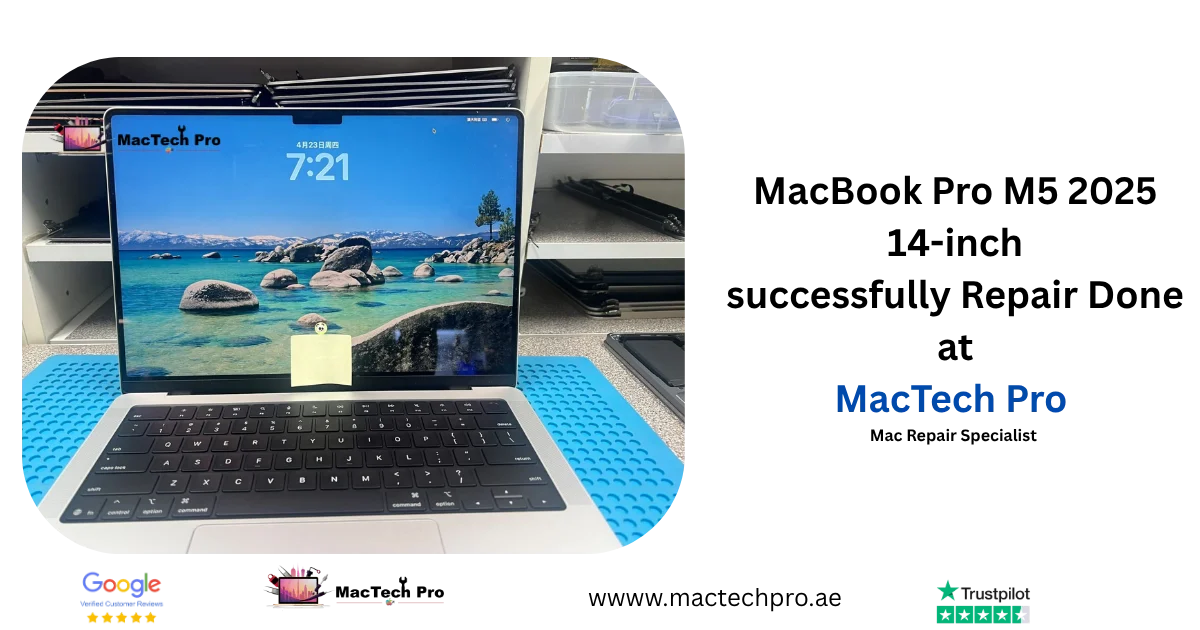
A brand-new M5, dead from a spill
A customer walked into the lab with the newest 14-inch MacBook Pro (M5, model A3434). A few months old. One liquid spill, and it was completely dead.
He’d already been to the Apple Store. The quote: AED 5,500+ for a full logic board replacement. And the catch nobody mentions until it’s too late — a board swap takes your data with the old board. Photos, work, everything, gone.
He brought it to us instead, and we got straight on it.
Corrosion eating into the board
Under the microscope you could see the corrosion already starting to eat into the logic board.
That’s the thing with these new M5 boards — the components are tiny and packed tight, and corrosion spreads fast. Every hour matters. The longer a spill sits, the further the damage travels and the more components it reaches, which is exactly why liquid damage is a race against the clock, not a job to leave for next week.
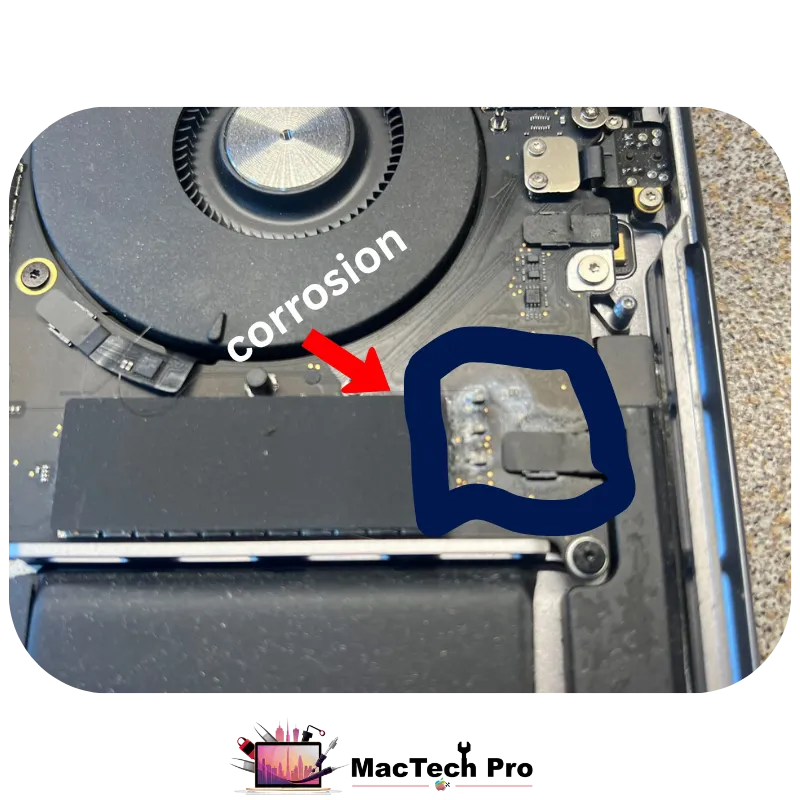
Three capacitors, not a dead board
Here’s what we actually found: the corrosion had only reached three capacitors. Not a dead board — three components.
We lifted the corrosion off with our ultrasonic cleaner, replaced all three caps, and the machine came back to life. Working perfectly. No board swap. No data loss. Back in his hands in two days.
The repair, step by step
1. Inspect under the microscope
The board is examined under magnification to map exactly how far the corrosion has spread — here, it had reached three capacitors and no further.
2. Ultrasonic clean the board
An ultrasonic cleaner drives the corrosion and residue out from around and beneath the tiny components, where a brush or cloth could never reach.
3. Replace the affected components
The three corroded capacitors are removed and replaced by micro-soldering, restoring the affected circuits on the original board.
4. Test and return, data intact
The Mac is tested end to end. It powered up working perfectly, with every file still in place — back to the customer in two days.
What this repair came down to
In short, here’s what this repair came down to.
Corrosion contained
Liquid corrosion had only reached three capacitors, not the whole board.
Ultrasonically cleaned
The board was cleaned with an ultrasonic machine to lift corrosion from beneath the components.
Three capacitors replaced
The affected caps were micro-soldered out and replaced on the original board.
Working, data intact, 2 days
The Mac came back to life with all files kept, back in two days.
Why MacTech Pro
Why bring a liquid-damaged Mac to us rather than a parts-swap shop? Three reasons made the difference here.
Component-level expertise
We don’t just swap boards. We repaired the original logic board for a small fraction of the price Apple quoted.
Your data comes first
Because we repaired the board instead of replacing it, the customer’s files, photos and work stayed 100% intact.
Fast turnaround
This machine was back in the customer’s hands in just two days.
Spilled something? Do this now
Act fast. Power it off straight away, don’t plug it in to charge, and don’t keep trying to turn it on.
Then get it to a board-level lab quickly. Taking it somewhere that only swaps parts often burns the narrow window where your data is still recoverable. Corrosion works fast — we work faster. Our first steps after a MacBook spill guide walks through exactly what to do in the first few minutes.
Need a second opinion? Bring it to the people who actually look under the microscope.
Liquid damage: why every hour counts
Liquid damage isn’t a one-time event — it’s an ongoing process, and that’s what makes it so dangerous.
Corrosion keeps spreading across the board and eating into components long after the surface looks dry. On the newest M5 boards the parts are tiny and densely packed, so every hour the damage travels further, and the window to recover data shrinks. A spill that’s a simple three-capacitor repair on day one can become a multi-stage board failure — or unrecoverable data — if it sits for a week first. This is the one repair where waiting genuinely costs you money and files.
Component repair vs a board replacement
The instinct — and often the only option a parts-swap shop offers — is to replace the whole logic board. It’s rarely the right first move.
A board swap is fast for the repairer but expensive for you, and on these machines the storage is tied to the board, so a swap usually means losing your data too. Component-level repair takes more skill and the right tools, but when the damage is contained — like the three capacitors here — it costs a fraction of a replacement and keeps your data exactly where it is.
When a board replacement is the honest call
If a spill has been left for weeks and corrosion has spread across multiple stages of the board, a replacement may genuinely be the better option. We’ll tell you straight either way — after we’ve actually looked under the microscope, not before.
Ultrasonic cleaning, explained
One step does a lot of the heavy lifting in a proper liquid-damage repair, and most shops skip it.
What ultrasonic cleaning does
Ultrasonic cleaning uses a machine that drives corrosion and residue out from around and beneath the tiny components — places a brush or cloth can never reach. It’s a key step in proper liquid-damage repair, and it’s why we can rescue boards that other shops write off. Skipping it leaves corrosion sitting under the chips, where it quietly keeps doing damage even after a board appears clean.
Your data comes first
For most people, the machine is replaceable — the data isn’t. That’s why our approach puts your files first.
Because we repair your original board rather than swapping it, your storage and everything on it stays exactly where it is — there’s no migration and nothing to recover afterwards, as on this A3434. Where a spill has gone further and data is genuinely at risk, our MacBook data recovery service is part of the same in-house team.
The technician behind this repair
This repair was carried out by Dan, our lead technician and logic board repair specialist.
Liquid-damage work is some of the most time-sensitive board repair there is — reading where the corrosion has travelled, cleaning it out ultrasonically, and micro-soldering replacement components without disturbing the parts around them. Dan leads our logic board and liquid-damage repairs, which is why a contained spill like this M5 is a component-level fix for us rather than an automatic board replacement. Our screen and display side is run by Richard, so whatever your MacBook needs, it’s matched to the right specialist in-house.
Liquid & board faults we repair
This M5 spill is one of many liquid and board faults we trace and repair. If your Mac has taken a spill or won’t behave after one, it’s worth a board diagnosis before writing it off.
Liquid / water spill
Coffee, water, juice — cleaned ultrasonically and repaired at component level.
Dead after a spill
No power following liquid damage, traced to the corroded components.
Intermittent faults after liquid
Random shutdowns, ports or keys misbehaving once corrosion sets in.
Data at risk after liquid
Board repaired to keep your data, with recovery available if needed.
Won’t charge after a spill
Charging circuitry affected by corrosion, repaired at the chip level.
Corroded chips or rails
Affected components micro-soldered out and replaced on your own board.
Your liquid-damage repair, step by step
Free microscope assessment
We open the Mac and map exactly how far the corrosion has spread — at no charge, and fast, because every hour counts.
Honest, fixed quote
We tell you whether it’s a component-level repair or a board replacement, with a clear fixed price. Work starts only once you approve.
Ultrasonic clean & component repair
Dan cleans the board ultrasonically and micro-solders out the corroded components, keeping your original board and data.
Tested & returned
We test the Mac end to end and return it working, with your data intact and a warranty — by free delivery or for collection.
MacBook liquid damage repair in Dubai
MacTech Pro is an independent Apple-device specialist in Dubai Sports City. We provide MacBook liquid and water damage repair, logic board and micro-soldering repair, and data recovery in Dubai, with a No Fix, No Fee policy.
Every liquid-damage job starts with an honest assessment under the microscope: we map how far the corrosion has spread and tell you whether it’s a component-level repair or a board replacement before any work begins, at a fixed price you approve first. Pickup and delivery across Dubai is free, or you’re welcome to visit our Dubai Sports City service centre. If we can’t fix it, you don’t pay.
Why bring it to MacTech Pro
- We repair the board at component level, not just swap it. On the M1, M1 Pro and M1 Max, a single failed component is usually the whole fault. Repairing that part is cheaper than a board swap and keeps your storage and data intact.
- Free, honest diagnosis and a fixed price first. You see the real fault and the real cost before any work. No fix, no fee.
- Genuine or OEM-grade parts, fitted and tested. That matters more on these models, where the mini-LED display and large batteries are expensive to get wrong.
- Work done by Dan's bench. Power-rail diagnosis and micro-soldering on Apple Silicon by one of Dubai's more experienced technicians, with 380+ reviews behind the shop.
- Your data comes first. These are pro machines, and we treat the data on them as the priority on every board and liquid job.
- Free pickup and delivery across Dubai, secure courier to the rest of the UAE, and a 3-month warranty on the repair.
Who does the work
Dan
Dan runs the bench at MacTech Pro and handles the board-level work himself: power-rail diagnosis, micro-soldering and data recovery on Apple Silicon Macs, including the M1, M1 Pro and M1 Max MacBook Pro. If another shop has told you the board is dead or the repair isn't possible, he's usually the one who proves otherwise. Every repair described here is carried out or checked by his team. Meet the technician →
Serving all of Dubai
Searching for MacBook liquid damage repair “near me”? MacTech Pro collects and delivers free across Dubai, and ships securely UAE-wide. Areas we regularly cover:
More from MacTech Pro
MacBook liquid damage — frequently asked questions
Power it off immediately, don’t plug it in to charge, and don’t keep trying to switch it on — each of those can push current through wet circuits and cause more damage. Then get it to a board-level repair lab as fast as you can. With liquid, the sooner it’s opened and cleaned, the more is saved.
It can very often be repaired at component level instead of swapping the whole board. In this M5 case the corrosion had only reached three capacitors, so we cleaned the board ultrasonically and replaced those three components. A full board replacement is usually a last resort, not the first option.
Not necessarily. When we repair the original board rather than replace it, the storage stays in place and your files, photos and work remain intact, as they did here. A full board swap, on the other hand, usually means losing whatever was on the machine.
Far less. This customer was quoted AED 5,500+ for a full board replacement at Apple; repairing the actual faulty components cost a small fraction of that. The exact figure depends on how far the corrosion has spread, which is why fast action keeps the cost down.
It depends on the severity, but a contained spill like this one was turned around in two days. More widespread corrosion takes longer. We assess it first and tell you a realistic timeframe.
Corrosion keeps spreading across the board and eating into components long after the surface looks dry. On the newest M5 boards the parts are tiny and densely packed, so every hour the damage travels further, and the window to recover data shrinks.
Usually, yes, especially if it’s caught early. A new M5 is an expensive machine, and a contained spill is often a component-level repair costing a fraction of a replacement, with your data kept. We diagnose the exact damage first and tell you honestly where it stands.
It’s a machine that drives corrosion and residue out from around and beneath the tiny components, places a brush or cloth can never reach. It’s a key step in proper liquid-damage repair, and it’s why we can rescue boards that other shops write off.