
16″ MacBook Pro (2023) Wouldn’t Turn On — Logic Board Repaired, Data Saved
A real board-level rescue. A high-spec 16-inch MacBook Pro (2023, A2780) — an AED 11,000+ machine — came in dead, with the customer already told the data was ‘non-recoverable’ because the board needed replacing. Here is how Dan found insect debris had shorted the board, cleaned it under the microscope, repaired the damaged traces, replaced the shorted chips, and returned the Mac fully working with every file intact — in 48 hours. Because a ‘dead’ MacBook doesn’t have to mean lost data.
Component-level repair · Genuine-grade parts · 380+ reviews
Done by Dan's bench · Free pickup & delivery across Dubai
The Quick Answer
A high-spec 16-inch MacBook Pro (2023), worth over AED 11,000, came in dead, and the customer had already been told the data was ‘non-recoverable’ because the logic board needed replacing. The real story: replacing the board wipes your files, repairing it saves them. MacTech Pro found insect debris had shorted the board, cleaned it under the microscope, repaired the damaged traces, replaced the shorted chips, and returned the Mac fully working with every file intact, in 48 hours.
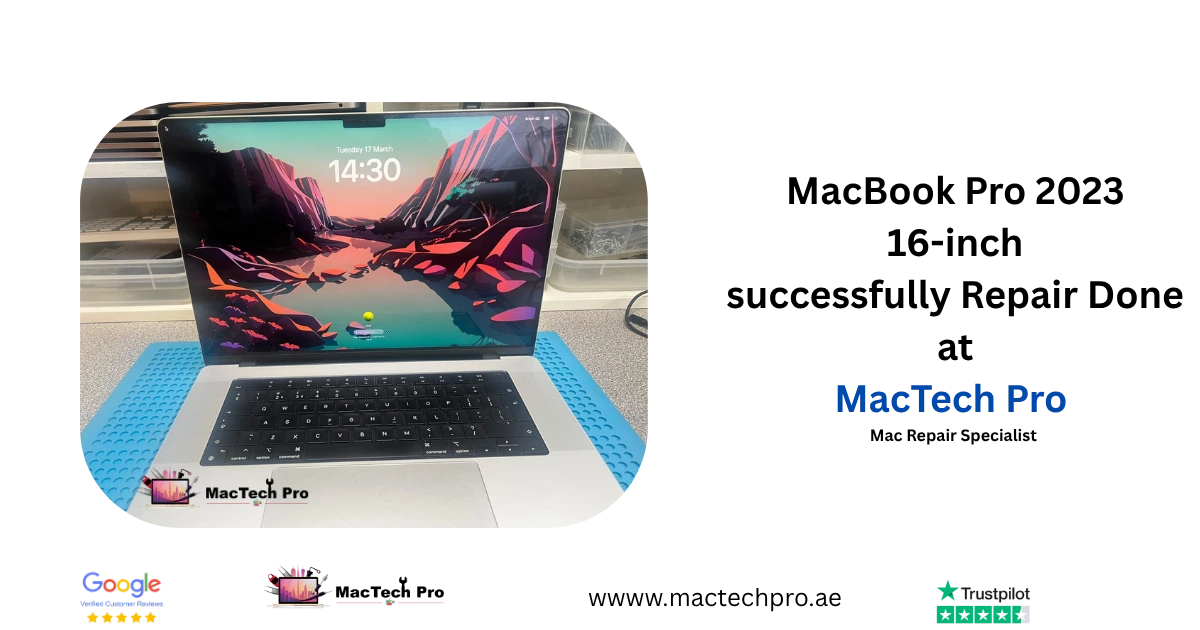
Dead, and written off as ‘non-recoverable’
We see it every week. Someone brings in a high-spec 16-inch MacBook Pro (2023), an AED 11,000+ machine, that won’t switch on — and they’ve already been told by the manufacturer that the data is ‘non-recoverable’ because the whole logic board needs replacing.
Replace the board, or repair it and keep your data
Here’s the truth they don’t spell out: replacing the board is the easy option for them, but it takes your files with it. Repairing the board is how you keep your data.
Why a board swap loses your data
On modern MacBooks the storage is tied to the logic board. Swap the board and you swap out the storage with it, so everything on the machine goes with the old board. Repairing the original board keeps that storage — and your files — exactly where they are. That single difference is why ‘the board needs replacing’ and ‘your data is gone’ get said in the same breath, when they don’t have to be.
Under the microscope — an insect short
This one was a good example.
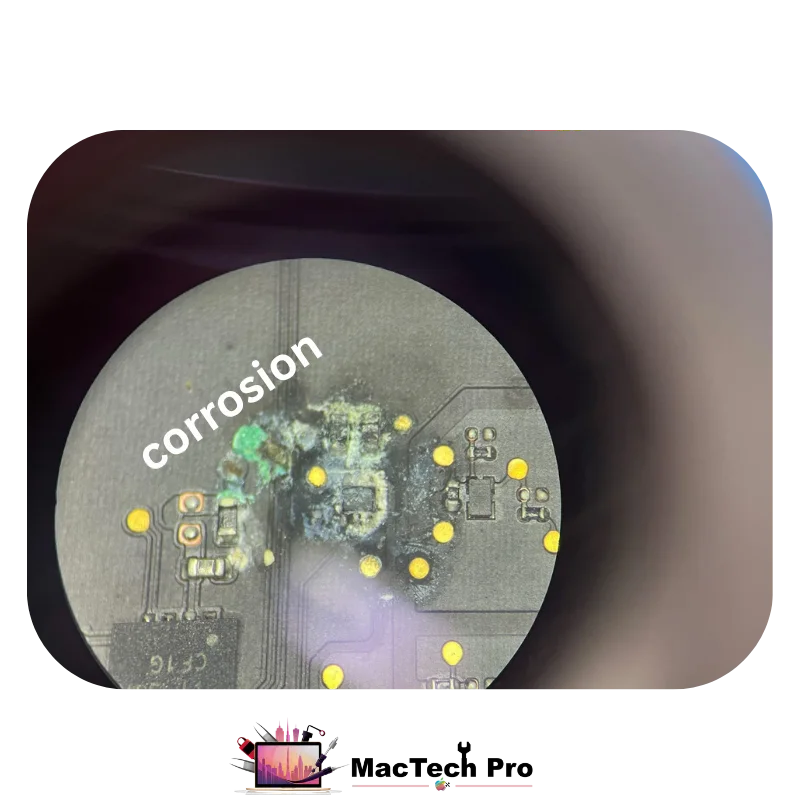
Under the microscope, the culprit was insect debris that had worked its way onto the board and bridged it, causing a short circuit. It looked like a mess. But 25+ years on the bench told us straight away: fixable.
How debris kills a board
Bridging and short circuits
Debris that gets onto a logic board can bridge contacts that were never meant to connect, creating a short circuit that can stop the Mac powering on entirely — which is exactly how this machine ended up looking ‘dead’ when the board itself was perfectly repairable.
Corroded copper traces
Left in place, that same debris corrodes the fine copper traces that carry power and signals across the board, so the longer it sits, the more damage it does — another reason a dead Mac is worth diagnosing sooner rather than later.
Our 48-hour recovery process
From there, the rescue followed a clear, four-step process — start to finish in 48 hours.
Microscopic cleaning
Removing all the debris and corrosion from the board under magnification.
Trace repair
Rebuilding the tiny ‘roads’ that carry power and signals across the board.
Component replacement
Swapping the shorted chips for new ones.
Data verification
Confirming the system boots and the files are safe.
The customer walked away with a fully functional Mac and every single one of their important files intact.
Dead Mac? Don’t panic
Don’t accept ‘non-recoverable’ as the final word.
A board that’s been written off for replacement can often be repaired instead, and that’s the difference between losing your data and keeping it. If your Mac won’t turn on, stop forcing the power button and bring it in for a proper board-level diagnosis. Talk to the experts at MacTech Pro first — our MacBook data recovery and recover data from a broken MacBook pages cover the wider picture.
Why ‘non-recoverable’ often isn’t
‘Non-recoverable’ is one of the most expensive words in tech — and it’s often simply not true.
When a repairer’s only option is to replace the whole board, the data is declared lost because a board swap discards everything on it. But a Mac that seems completely dead is frequently a short circuit or a few failed components, not a genuinely dead board. The data isn’t gone — it’s sitting safely in storage on a board that can be repaired. The honest first step is a board-level diagnosis to find the actual fault, not a default quote to replace the lot.
What trace repair actually is
One step in this repair does a lot of the work and is worth understanding.
What trace repair actually is
The ‘roads’ on the board
The board carries power and signals along microscopic copper pathways — the ‘traces.’ When damage or corrosion breaks one, the circuit it belongs to stops working, and the Mac can fail in ways that look like a total board failure.
Rebuilding a broken trace by hand
Trace repair means rebuilding that pathway by hand under the microscope so the circuit works again. It’s painstaking, skilled work, and it’s a big part of why a board that looks ruined can come back to full health rather than being replaced.
Your data comes first
For most people, the machine is replaceable — the data isn’t. That’s the whole point of repairing rather than replacing.
Because we repair your original board instead of swapping it, your storage and everything on it stays exactly where it is — there’s no migration and nothing to recover afterwards, as on this 16-inch Pro. Where a board is genuinely beyond repair, our data recovery team works to retrieve the files directly. Either way, your data is the priority, not an afterthought.
The technician behind this repair
This repair was carried out by Dan, our lead technician and logic board repair specialist.
Reviving a board that everyone else has written off — reading where a short sits, cleaning debris and corrosion under the microscope, rebuilding broken traces by hand and replacing shorted chips — is some of the most demanding work on the bench. With 25+ years of board-level experience behind it, a ‘dead’ board with insect debris like this is something we can read and repair rather than replace by default. Dan leads our logic board and data-saving repairs; our screen and display side is run by Richard, so whatever your MacBook needs, it’s matched to the right specialist in-house.
Dead-board & data faults we repair
This insect-debris short is one of many dead-board and data faults we trace and repair. If your Mac won’t power on, it’s worth a board diagnosis before accepting it’s gone.
Won’t turn on at all
A seemingly dead Mac that’s often a short or a few failed components, not a dead board.
Short circuit on the board
Bridged contacts from debris, liquid or damage, traced and repaired.
Damaged or corroded traces
Broken copper pathways rebuilt by hand under the microscope.
‘Data non-recoverable’ verdicts
Boards written off for replacement, repaired instead to keep your files.
Debris or pest damage
Insect or foreign-object debris cleaned off and the board restored.
Shorted chips or rails
Failed components micro-soldered out and replaced on your own board.
Your board rescue, step by step
Free board-level diagnosis
We find why the Mac won’t power on — a short, debris, failed components — and whether the board can be repaired to save your data, at no charge.
Honest, fixed quote
We tell you whether it’s a data-saving repair or a genuine board replacement, with a clear fixed price. Work starts only once you approve.
Clean, trace repair & component swap
Dan cleans the board under the microscope, rebuilds damaged traces and replaces shorted chips — keeping your original board and data.
Verified & returned
We confirm the system boots and your files are safe, then return the Mac working, with a warranty — by free delivery or for collection.
MacBook dead-board repair & data recovery in Dubai
MacTech Pro is an independent Apple-device specialist in Dubai Sports City. We provide component-level MacBook logic board repair and data recovery in Dubai, with a No Fix, No Fee policy — and 25+ years on the bench behind every job.
Every dead-board job starts with an honest board-level diagnosis: we find the actual fault — a short, debris, failed components — and tell you whether it’s a repair that saves your data or a genuine replacement, before any work begins, at a fixed price you approve first. Pickup and delivery across Dubai is free, or you’re welcome to visit our Dubai Sports City service centre. If we can’t fix it, you don’t pay.
Why bring it to MacTech Pro
- We repair the board at component level, not just swap it. On the M1, M1 Pro and M1 Max, a single failed component is usually the whole fault. Repairing that part is cheaper than a board swap and keeps your storage and data intact.
- Free, honest diagnosis and a fixed price first. You see the real fault and the real cost before any work. No fix, no fee.
- Genuine or OEM-grade parts, fitted and tested. That matters more on these models, where the mini-LED display and large batteries are expensive to get wrong.
- Work done by Dan's bench. Power-rail diagnosis and micro-soldering on Apple Silicon by one of Dubai's more experienced technicians, with 380+ reviews behind the shop.
- Your data comes first. These are pro machines, and we treat the data on them as the priority on every board and liquid job.
- Free pickup and delivery across Dubai, secure courier to the rest of the UAE, and a 3-month warranty on the repair.
Who does the work
Dan
Dan runs the bench at MacTech Pro and handles the board-level work himself: power-rail diagnosis, micro-soldering and data recovery on Apple Silicon Macs, including the M1, M1 Pro and M1 Max MacBook Pro. If another shop has told you the board is dead or the repair isn't possible, he's usually the one who proves otherwise. Every repair described here is carried out or checked by his team. Meet the technician →
Serving all of Dubai
Searching for MacBook dead board repair and data recovery “near me”? MacTech Pro collects and delivers free across Dubai, and ships securely UAE-wide. Areas we regularly cover:
More from MacTech Pro
Dead MacBook & data — frequently asked questions
Often, no. When the recommendation is to replace the whole logic board, the data is declared lost because a board swap discards everything on it. But if the board can be repaired instead, the storage stays in place and the data is usually recoverable, as it was in this 16-inch case.
On modern MacBooks the storage is tied to the board, so swapping the board means losing whatever was on the machine. Repairing the original board keeps that storage, and your files, exactly where they are.
Yes, very often. A Mac that seems completely dead is frequently a short circuit or a few failed components, not a genuinely dead board. We diagnose the actual fault and repair it, rather than replacing the whole board by default.
Debris that gets onto the board can bridge contacts that aren’t meant to connect, causing a short circuit, and it can corrode the fine copper traces over time. That’s what happened here, and a careful microscopic clean plus trace repair fixed it.
The board carries power and signals along microscopic copper pathways, the ‘traces.’ When damage or corrosion breaks one, we rebuild that pathway by hand under the microscope so the circuit works again.
This repair was completed in 48 hours. The exact time depends on how much damage there is, but a contained fault like this is usually a quick turnaround. We give you a realistic timeframe after the diagnosis.
Usually, yes, especially for a high-value machine like this one, and even more so when the goal is saving your data. A component-level repair typically costs a fraction of a full board replacement. We assess it first and tell you honestly.
Stop repeatedly forcing the power button, and don’t write off your data. Bring it in for a board-level diagnosis. If your files matter, repairing the board, rather than swapping it, is the route that keeps them.