
A 16-inch MacBook Pro (A2141) That Was Dead, Then Blind: a Burned Board and a GPU That Wouldn’t Start
Two serious faults in one machine. A shorted PP5V_G3S rail with a carbonised, burned board — then, once it had power, a GPU sequence that started and aborted after 35 ms. Both traced, both fixed, board saved, data untouched.
Voltage injection · Thermal imaging · Oscilloscope timing · 380+ reviews
Repaired by Dan — lead technician · Free pickup & delivery across Dubai
Quick Answer
A 16-inch MacBook Pro A2141 (board 820-01700) came into MacTech Pro dead, no power, no water damage. The USB-C port read 5V / 0A, and the PP5V_G3S rail was shorted. Voltage injection heated CA601, where a bug had caused a burnt, carbonised short, we cut out the damaged board material, rebuilt 3 broken traces and replaced UA600, and the board took 20V again. But there was still no display. Oscilloscope timing showed the GPU power sequence starting and then aborting after about 35 ms. The cause was two open pins on UA600 (pins 23 and 30); we jumpered them back to their paths, the GPU voltages held, and the Mac worked normally. Two faults, one machine, both fixed. Dead MacBook or no display? Call MacTech Pro on +971 50 951 6827.
This one was two repairs in one: a MacBook that was completely dead, and then, once it had power, completely blind.
A 16-inch MacBook Pro A2141 (logic board 820-01700) came in with a sudden no-power fault. It had simply stopped, no warning. First thing we ruled out was liquid, there was no water damage anywhere on the board. So whatever had killed it was electrical, and it was hiding.
Stage One: A Dead Board and a Short
We started at the charger. The USB-C reading told the opening chapter of the story:
| Measurement | Reading |
|---|---|
| USB-C | 5V / 0A |
The port was offering 5V but the Mac was drawing no current at all, 0A, which means the machine wasn’t negotiating for power the way a healthy board would. Something was stopping it before it could even ask for the full voltage. So we went to the power rails and measured, and found the culprit:
| Measurement | Reading |
|---|---|
| PP5V_G3S | shorted |
A shorted rail is being dragged to ground, so power can’t build on it, and the board can’t start. But a multimeter only tells you the rail is shorted, not which component is doing it. Dozens of parts sit on that rail. To find the exact one, you make the board show you.
Finding the short: voltage injection
We used voltage injection, feeding a low, current-limited voltage into the shorted rail. Current flows to the path of least resistance, which is the faulty part, so that part heats up while everything else stays cold.

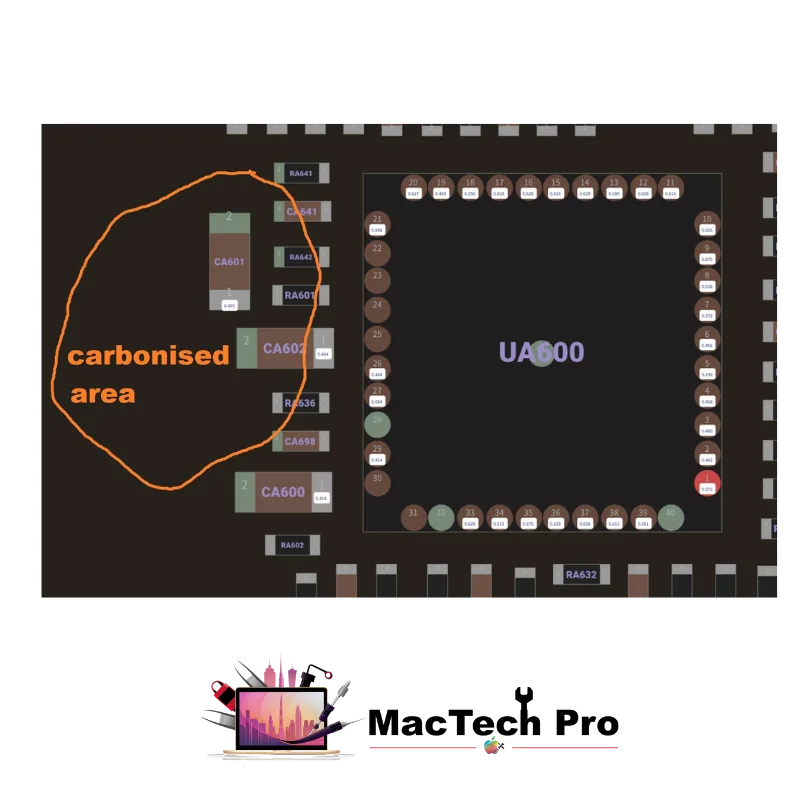
CA601 got hot. And when we looked closely, the cause was almost unbelievable: a bug. An insect had gotten onto the board at CA601, and it had caused a short severe enough that the board itself had carbonised and burned. The board material around it was charred, and carbonised board is conductive, it becomes part of the short, so it can’t just be cleaned, it has to be physically removed.
Repairing burned board material
This is delicate, destructive-then-reconstructive work. You have to cut away the damaged, burnt material entirely, then rebuild the circuitry that ran through it. Here’s what stage one involved:
- Carbonised short removed
- Roughly 5 mm × 5 mm of damaged board area cleaned out
- 3 broken surface traces repaired, rebuilding the pathways that ran through the burnt zone
- UA600 replaced
After that, the board accepted 20V again. The short was gone, the power was flowing, the dead machine had a pulse. But it wasn’t over, because when we powered it, there was still no display.
Stage Two: Power, but No Picture
A Mac that powers but shows nothing is a different problem entirely. The board is alive, but something in the chain that brings the display up is failing. On this machine, that pointed at the GPU power sequence, the precise, timed order in which the graphics processor’s voltages have to switch on for a picture to appear.
This is where you need an oscilloscope and an understanding of the sequence itself, because these voltages don’t just need to be present, they need to appear in the right order and stay up. We tested the sequence step by step, and it told a very specific story:
| Measurement | Reading |
|---|---|
| PMU_SYS_ALIVE | 1.8V, OK |
| DISP_GCON_RESET_L | 1.8V, OK |
| EG_VR0 / VR1 / VR2 / VR3 / VR4 | appeared for about 35 ms |
| GPU voltages | appeared briefly, then dropped |
| PPGFX_S0_GPU | reached target voltage, then dropped after about 1 ms |
Read that together and it’s clear: the GPU sequence was starting, then aborting. The voltages came up, held for a few milliseconds, and collapsed. The board was trying to bring the graphics up, getting a fraction of the way, and giving up, every single time. That’s not a random failure. That’s a sequence hitting a wall at a specific point.
Tracing the abort to UA600
The evidence led back to UA600. We removed it and checked every pin in diode mode, the measurement that reveals whether each connection is intact or broken, and found the problem:
| Measurement | Reading |
|---|---|
| Pin 23 | open |
| Pin 30 | open |
Two pins were open, meaning those connections were broken, the signal paths through them simply weren’t there. With those paths missing, the GPU sequence could begin but never complete, which is exactly the 35-millisecond start-then-abort we were seeing on the scope.
We jumpered both pins back to their original paths, rebuilding the broken connections by hand. And with that, the GPU voltages came up and held, stable, no more collapse. The display came to life, and the MacBook worked normally.
The Full Result
One machine, two serious faults, both traced and both fixed:
- No-power fault fixed
- Burned board area repaired, carbonised material removed and traces rebuilt
- GPU no-display fault diagnosed through power-sequence timing
- UA600 open pins (23 and 30) repaired
- MacBook fully functional again
Why This Case Matters: Knowing the Sequence
This repair is a clear example of why board-level work is a skill, not a parts-swapping exercise.
The first fault, the burned short, you can find with injection and a thermal camera. But the second, the GPU refusing to display, would defeat most repairs completely. There was nothing visibly wrong. The board had power. Swapping parts at random would have cost a fortune and likely never fixed it.
What solved it was understanding the GPU power sequence, and having the oscilloscope to watch it happen. The 35-millisecond start-then-abort wasn’t just a symptom, it was a map. It told us the sequence was reaching a specific point and failing, which pointed straight at the connections carrying it. Without that timing logic, you’re guessing. With it, the board tells you exactly where it’s broken.
That’s the difference between a real board-level lab and a shop that replaces boards and hopes. We diagnose, then repair, the actual fault, even when there are two of them hiding in the same machine.
Who does the work
Dan
Voltage injection, burned-board reconstruction and oscilloscope-led GPU-sequence diagnosis is exactly the work Dan does at MacTech Pro — reading the timing, rebuilding traces and jumpering broken pins by hand, and saving boards other shops would replace. Screen and display work is handled by Richard. Meet the technician →
If Your MacBook Is Dead, or Has No Display
Both faults in this repair looked hopeless from the outside. Neither was. If your Mac won’t power on, or powers but shows nothing:
- Note exactly what it does. No light at all? A chime but black screen? A fan spinning with no picture? Each points somewhere different, and it helps us enormously.
- Try an external monitor if it powers but shows nothing. If an external display works but the built-in doesn’t, that narrows the fault considerably.
- Don’t keep forcing power for long stretches. If there’s a short on the board, holding power won’t help it, and can make things worse.
- Don’t accept “board replacement” as the only option without a real board-level diagnosis. As this case shows, even a burned board with two separate faults can often be repaired.
Bring it to us for a proper diagnosis, or call MacTech Pro first on +971 50 951 6827 and tell us exactly what it’s doing.
Why Dubai Customers Bring the Hard Cases to MacTech Pro
Some repairs are beyond a general repair counter, and a burned board with a GPU sequence fault is squarely one of them.
- True board-level diagnosis, voltage injection, thermal imaging, oscilloscope, and diode-mode measurement
- We understand the power-on and GPU sequences, so we find faults that parts-swapping never will
- We repair burned boards and broken traces, not just replace whole boards
- We fix the actual fault, even when there’s more than one in the same machine
- Your data stays safe, because your original board stays in your machine
- Free pickup and delivery across Dubai, including Dubai Sports City, Motor City, Dubai Marina, Downtown Dubai, Business Bay, Al Barsha, JLT, JVC, and Deira
- Honest answers, and a warranty on the work
MacBook no-power & no-display board repair in Dubai
MacTech Pro is an independent Apple-device specialist in Dubai Sports City, and the hard board-level cases — shorted rails, burned boards, GPU no-display — are exactly what we specialise in. Every job runs on a No Fix, No Fee basis.
Free board-level diagnosis
We measure the rails, inject where needed, scope the sequences and read the timing before quoting — then give you a fixed price you approve before any work begins.
We repair boards other shops replace
Burned material removed, traces rebuilt, broken pins jumpered by hand — keeping your original board and your data instead of swapping the whole thing.
Free pickup and delivery across Dubai
We collect your MacBook anywhere in Dubai, diagnose and repair it at our Dubai Sports City bench, and return it — free of charge — or you’re welcome to walk in.
More from MacTech Pro
What Our Dubai Customers Say
Frequently Asked Questions
Not necessarily. A Mac that powers but shows nothing is often a fault in the GPU power sequence or a board-level issue, not the screen itself. It needs proper timing diagnosis with an oscilloscope, exactly what we did in this repair, to find where the sequence fails. Try an external monitor, then call MacTech Pro on +971 50 951 6827.
Often, yes. Carbonised board material has to be physically removed because it’s conductive, then the traces that ran through it are rebuilt by hand, as we did here with a roughly 5 mm area and 3 traces. It’s delicate work, but far better than scrapping the board. MacTech Pro does exactly this, call +971 50 951 6827.
It means that rail is being pulled to ground by a faulty component, so power can’t build on it and the Mac won’t start, which is why it read 5V / 0A here. We locate the shorting part with voltage injection and a thermal camera, then repair it. For your machine, call MacTech Pro on +971 50 951 6827.
Usually the fault can be repaired at component level, even complex ones. This board had two separate faults, a burned short and a GPU-sequence problem, and both were fixed without replacing the board, keeping the customer’s data. MacTech Pro diagnoses first and tells you honestly. Call +971 50 951 6827.
No. Because we repair your original board rather than replacing it, your storage and everything on it stay exactly where they are. That’s a major reason to choose board-level repair over a board swap. If data is your priority, tell MacTech Pro when you call on +971 50 951 6827.
It depends entirely on what’s failed, which is why we diagnose before quoting, but a component-level repair is a fraction of a full board replacement, even a two-fault repair like this one. Call MacTech Pro on +971 50 951 6827, describe what the Mac is doing, and we’ll give you a realistic idea.