
No Sound on a MacBook Air 15″ M4 (A3241): A Corroded Audio Chip, Found and Replaced in Dubai
A working DJ’s brand-new MacBook Air had gone completely silent, and a full macOS reinstall changed nothing. That was the clue that pointed us straight to the hardware — and to one corroded chip on the logic board.
Component-level repair · Genuine-grade parts · 380+ reviews
Done by Dan’s bench · Free pickup & delivery across Dubai
The Quick Answer
A Dubai DJ brought a 15-inch MacBook Air M4 (A3241) into MacTech Pro with no sound at all, and he’d already tested everything and done a full macOS reinstall with no change. That reinstall was the clue: when a clean macOS doesn’t restore sound, the fault is hardware, not software. On the bench, the audio IC, the chip that drives the sound, was corroded. After a full logic board test confirmed the corrosion was isolated to that one chip, we replaced it with a genuine sound IC, and the audio came straight back. Data untouched, no full board swap. No sound on your Mac after a reinstall? Call MacTech Pro on +971 50 951 6827.
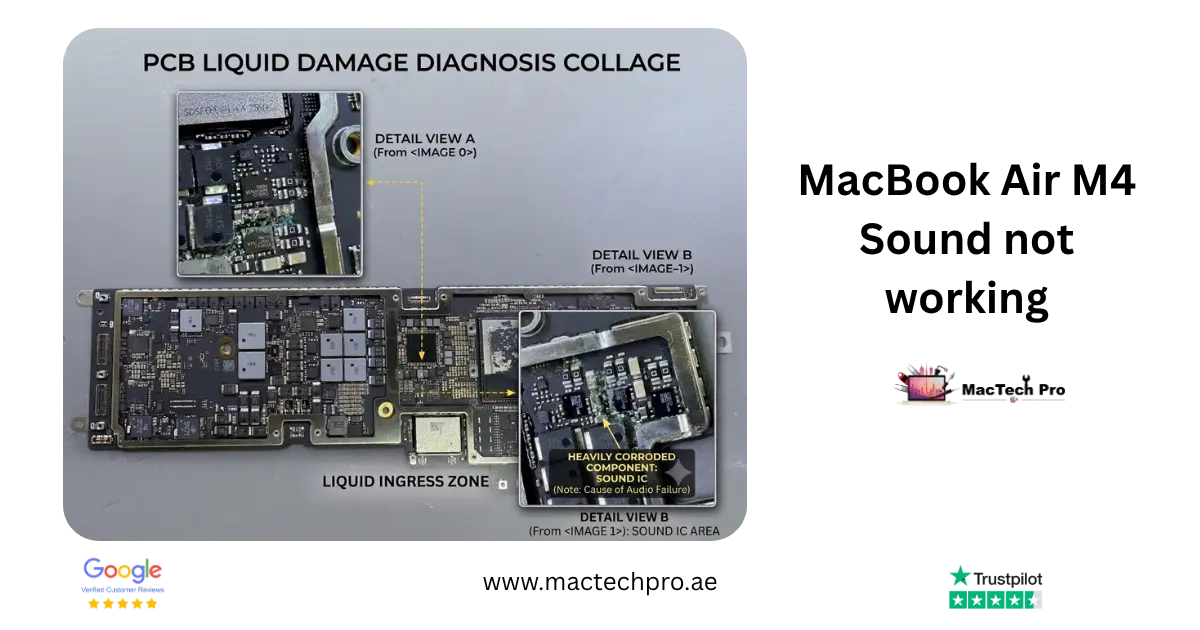
A DJ walked into MacTech Pro with a 15-inch MacBook Air M4 (A3241) and one very specific problem: no sound.
Nothing from the speakers. Nothing that made any sense to him. And for a working DJ in Dubai, a laptop with no audio isn’t an inconvenience, it’s the whole job grinding to a halt. He had sets to play and a machine that wouldn’t make a sound.
Before he ever reached us, he’d done his homework, and then some. He’d checked every setting and every output, tried every app. Then he went all the way, wiped the MacBook completely and installed a fresh copy of macOS from scratch. Still nothing. Silence. By the time he sat down at our counter he was well past frustrated: gigs booked, income on the line, and a brand-new Mac that had gone mute.
The Reinstall Was Actually the Best Clue
Here’s the part most people miss. That clean macOS install was the single most useful troubleshooting step he could have taken, and not because it fixed anything. Because it didn’t.
When you wipe a Mac, reinstall the operating system, and the sound still doesn’t work, you’ve just ruled out software almost entirely. A fresh macOS means fresh audio drivers, default settings, and no rogue app quietly hijacking the output. If the speakers are still dead after all of that, the problem is almost never software, it’s the hardware that physically produces the sound. So that’s exactly where I went looking.
What I Found When I Opened It
I opened the MacBook up and went straight to the logic board.
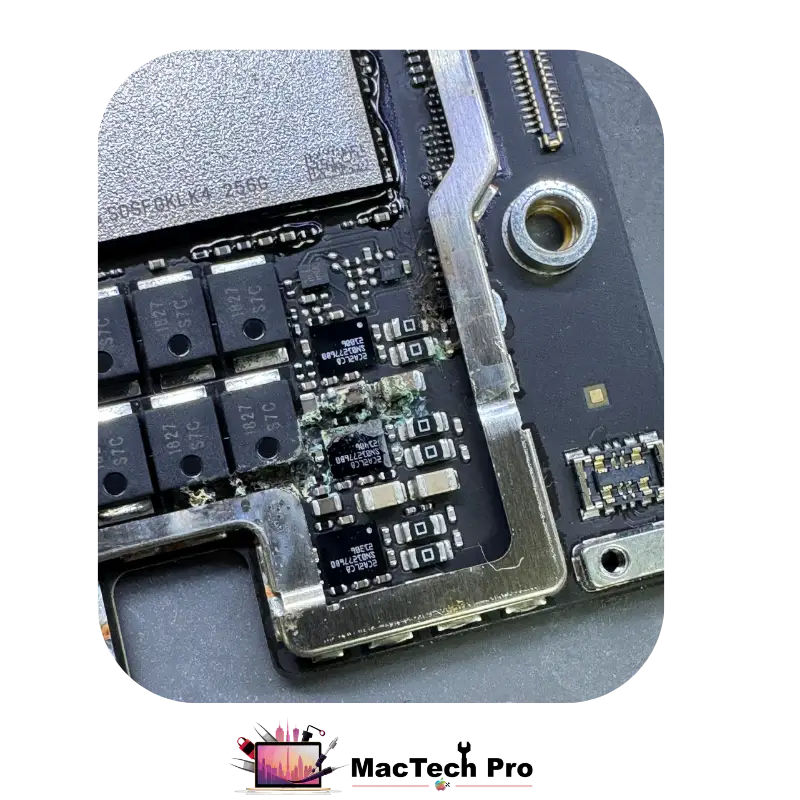
Under magnification, there it was: corrosion on the sound IC, the small chip that drives the audio. In the photo you can see it clearly, that dull, crusty discolouration on and around the chip is corrosion, and on an audio IC that’s more than enough to kill the sound completely.
I didn’t stop at the first thing I found, though. A proper diagnosis means testing the whole board, not just the obvious suspect, because corrosion in one spot often means liquid has touched others. So I went over the entire logic board, checked the rails, the surrounding components, the connections around the audio circuit. And in this case, the news was good: the corrosion was isolated. One chip. The sound IC, and nothing else.
What the Sound IC Actually Does
The sound IC, the audio codec, is the chip that turns the digital audio your Mac generates into the analogue signal your speakers and headphone output can actually play. Every track, every beat, every system chime passes through it. When it’s healthy, you never think about it for a second. When it’s corroded or damaged, the speakers fall silent even though the rest of the Mac runs perfectly, which is precisely what this DJ was living with. The music was right there in the software. It just had no working chip to come out through.
How Does Corrosion End Up on the Board?
Corrosion like this almost always means moisture reached the board at some point, even a small amount you may never have noticed. A drink set a little too close on the booth. Condensation off a cold bottle. The heat and humidity of a packed club, or simply Dubai’s climate working on the machine over time. It doesn’t take a full spill, a little moisture in the wrong place, left to sit, will slowly eat into a chip’s legs and the tiny contacts around it. That’s why this kind of fault can surface weeks after the moment that caused it, long after everything felt completely fine.
The Repair
The fix was clean and specific: remove the corroded sound IC and fit a new, genuine replacement. This is micro-soldering work, the chip is tiny, the pads around it are delicate, and it has to come off and go back on without disturbing anything nearby, all done under a microscope.
We used a genuine, original-spec sound IC rather than a cheap substitute, and that matters. An audio chip that isn’t up to spec can bring its own trouble down the line, distortion, dropouts, or another early failure. Once the new IC was fitted and the area cleaned up properly, we powered the Mac and tested the audio end to end. Sound, back. Speakers and headphone output, all of it, working exactly as it should.
Why We Repair the Chip Instead of Replacing the Board
Take a machine like this somewhere that only does whole-unit swaps, and the answer is often a full logic board replacement, which on a current M4 Air is a serious cost, and usually means losing whatever’s stored on it. Repairing the actual faulty chip is a fraction of that price. It keeps your original board, and your data stays exactly where it is.
For a single corroded audio IC, replacing the whole board is like scrapping a car because one bulb blew. We replace the bulb. That’s the entire point of component-level repair, find the one thing that’s actually broken, and fix that.
The Result
A machine that was “broken” by every test he could throw at it, back to full working order, because the real fault was one small chip, found and replaced. He was, understandably, very happy.
Who does the work
Dan
The audio IC diagnosis and micro-soldering in this case study is exactly the board-level work Dan handles at MacTech Pro — isolating a corroded chip, confirming the rest of the board is clean, and replacing it without disturbing the data. If another shop has quoted a full board swap, he’s usually the one who fixes the one chip instead. Our screen and display side is run by Richard. Meet the technician →
No Sound on Your Mac? How to Tell What You’re Dealing With
Before you panic, a few quick things help point to whether it’s software or hardware:
- Check the output device. Click the volume/sound control and make sure output is set to the built-in speakers, not a Bluetooth device or an HDMI screen it’s stuck on.
- Try headphones. If headphones play but the speakers don’t (or the other way round), that already narrows down where the fault is.
- Note when it started. If the sound went after a spill, moisture, or for no clear reason at all, suspect hardware.
- If you’ve already reinstalled macOS and there’s still no sound, it’s almost certainly hardware, the audio IC or its circuit, and it needs a board-level look, not more software fiddling.
If that sounds like your situation, don’t keep reinstalling and hoping. Bring it to MacTech Pro, or call us first on +971 50 951 6827, and we’ll tell you what we’re looking at.
Why Dubai’s DJs and Creatives Trust MacTech Pro
For anyone whose work runs on their Mac, a DJ, a producer, a video editor, downtime is lost income, and a careless repair is worse than no repair. Here’s why creatives across the city bring their machines to us:
- Component-level, micro-soldering repair, we fix the faulty chip, we don’t just swap the whole board
- Genuine, original-spec parts, so a repair lasts and doesn’t create new problems
- We test the entire logic board, not only the obvious fault, so nothing gets missed
- Your data stays intact, because your original board and drive stay with the machine
- We serve customers right across Dubai, including Dubai Marina, Downtown Dubai, Business Bay, Al Barsha, JLT, Deira, and Dubai Sports City
- Repairs are tested under real use before they go back, and come with a warranty
MacBook audio & sound IC repair in Dubai
MacTech Pro is an independent Apple-device specialist in Dubai Sports City, and board-level audio IC (no sound) faults are exactly the kind of component work we do every week. Every job runs on a No Fix, No Fee basis.
How an audio IC job works with us
Free diagnosis, honest quote
We test the board before quoting — because the real cost depends on the chip and how far any corrosion has spread — and give you a fixed price you approve before any work begins.
No Fix, No Fee
If we can’t bring the sound back, you don’t pay the labour. Your original board and your data stay with the machine throughout.
Free pickup and delivery across Dubai
We collect your MacBook anywhere in Dubai, repair it at our Dubai Sports City bench, and return it — free of charge — or you’re welcome to walk in.
More from MacTech Pro
What Our Dubai Customers Say
Frequently Asked Questions
It almost always means the fault is hardware, not software. A clean macOS reinstall clears the drivers and settings, so if the sound is still dead afterwards, the problem is usually the audio IC or its circuit on the logic board. That’s a board-level repair. Call MacTech Pro on +971 50 951 6827 and we’ll check it for you.
Yes. The audio IC is replaceable at component level, it’s micro-soldering work done under a microscope with a genuine chip, no full board swap needed. MacTech Pro does exactly this kind of repair regularly, so call +971 50 951 6827 if your Mac has lost its sound.
Most often it’s corrosion from moisture or a small liquid exposure, sometimes one you never noticed, which eats into the chip and the contacts around it. Occasionally it’s a component fault. Either way, it needs a proper clean and, usually, a new IC. MacTech Pro diagnoses the exact cause before doing anything, reach us on +971 50 951 6827.
No. Replacing the sound IC is a board-level component repair, your storage isn’t touched, and your files stay exactly where they are. Keeping your data intact is one of the main reasons component-level repair beats a full board replacement. Questions? Call MacTech Pro on +971 50 951 6827.
It depends on the chip and how much corrosion the board has, which is why we diagnose before quoting, but a component-level sound IC repair costs a fraction of a full board replacement. Call MacTech Pro on +971 50 951 6827, tell us what happened, and we’ll give you a realistic idea.
Almost always, yes. The M4 Air is a recent, valuable machine, and a single corroded audio chip is a small, targeted repair, far cheaper than replacing the board or the laptop. MacTech Pro will tell you honestly if a machine ever isn’t worth fixing. Call +971 50 951 6827.