
MacBook Pro M1 Battery Replacement Dubai
If your MacBook Pro M1 2020 is losing charge faster than before, shutting down unexpectedly, or only powering on when connected to a charger, you may be experiencing battery issues. At MacTech Pro in Dubai, we specialize in replacing the battery in MacBook Pro 13-inch M1 2020 models. We provide original A2389 batteries, transparent pricing at 380 AED, a 6-month warranty, and a battery replacement time of just 2–3 hours.
The MacBook Pro 13-inch M1 (Model A2338), released in November 2020, was the first MacBook Pro to feature Apple's M1 chip, offering impressive performance and an advertised battery life of up to 17–20 hours. However, like all lithium-ion batteries, the A2389 battery degrades over time. After 500–1,000 charge cycles — typically reached in 2–3 years by heavy users — battery health declines significantly. A battery that once lasted 17 hours may now last only 4–5 hours, and performance throttling and unexpected shutdowns can make the device difficult to use.
Replacing your MacBook Pro battery at MacTech Pro in Dubai is a straightforward and cost-effective process that can significantly enhance your device's performance. With a new original A2389 battery, your MacBook Pro M1 will regain full battery life, prevent unexpected shutdowns, and restore optimal functionality. Each replacement is supported by a 6-month warranty, providing assurance and reliability.
For those seeking MacBook Pro battery replacement in Dubai — whether for the M1 model or A2338 — MacTech Pro provides comprehensive solutions. We serve customers throughout Dubai, including Downtown, Marina, Jumeirah, Business Bay, Deira, Bur Dubai, Silicon Oasis, Mirdif, JVC, Al Barsha, and all other communities across the emirate.
| Service Detail | Specification |
|---|---|
| Device | MacBook Pro 13-inch M1 (A2338) — 2020 |
| Battery Model | A2389 |
| Battery Type | Original Apple / Apple OEM |
| Price | 380 AED |
| Warranty | 6 Months |
| Repair Time | 2–3 Hours |
| Same-Time Repair | Yes — Fixed in front of customer on request |
| Location | Stadium Point Building, Office No. 311, Dubai Sports City, Dubai, U.A.E |
| Shop Name | MacTech Pro |
Understand Your MacBook Pro M1 2020 Battery — and Why It's Worth Replacing It Early
Understanding the A2389 battery in your MacBook Pro M1 (2020) is important, particularly as the device ages. Timely replacement with a new, original cell can effectively restore your laptop's performance.
A2389 Battery Specifications
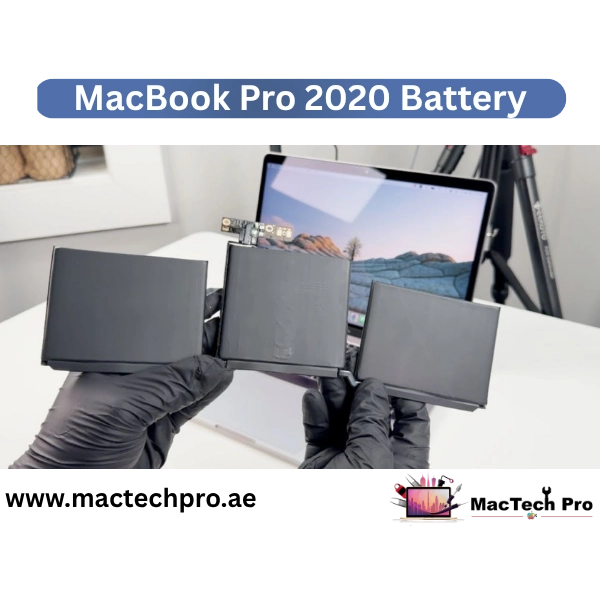
This battery is used in the MacBook Pro 13-inch M1 (model A2338) released in late 2020. It's a lithium-polymer (Li-Po) type — the same technology found in almost all Apple devices. Its strengths include high energy storage, safety, and easy fit in a thin laptop.
- Capacity: 58.2 watt-hours (Wh) — When new, Apple claims this capacity provides up to 17 hours of wireless web browsing and 20 hours of movie viewing using the Apple TV app — a significant amount for a laptop.
- Voltage: 11.46V
- Design: Three lithium-polymer cells are stacked flat together under the keyboard.
How Many Charge Cycles Does It Last?
Apple designed the battery to retain at least 80% of its initial capacity for 1,000 charge cycles.
A "charge cycle" means using 100% of the battery's capacity, whether in a single charge or multiple charges. For example, using 50% today, 50% tomorrow — that's one cycle.
If someone drains the battery and charges it every day, 1,000 cycles equal approximately 2.7 years.
When Does the Effect Become Visible in Real Life?
In cities like Dubai (which are often hot), users may notice battery degradation within 18 to 30 months. This depends entirely on:
- How you charge
- How hot do you expose your laptop
- How frequently and for how long you use it
Heat Is a Particular Risk (Especially for Dubai)
Lithium-ion and lithium-polymer batteries are highly susceptible to heat damage. In Dubai, elevated temperatures — whether indoors or outdoors — can accelerate battery degradation. Frequent exposure to such conditions will likely reduce your MacBook Pro's battery lifespan.
Conclusion — When to Replace?
If your laptop's battery life has diminished or you receive a "Service Recommended" message, it is advisable to replace the battery with a new original A2389 unit. This replacement will restore full-day power and significantly extend your MacBook's usability.
How to Check Your MacBook Pro M1 Battery Health
macOS provides built-in battery health information that shows the current condition of your A2389 battery. To check it, hold the Option key and click the battery icon in the menu bar — or go to Apple menu > System Settings > Battery > Battery Health (on macOS Ventura and later). You can also access detailed cycle count information by going to Apple menu > About This Mac > System Report > Power section, where you can see Battery Cycle Count, Condition, and Maximum Capacity percentage.
Signs That It's Time to Replace Your MacBook Pro M1 Battery
Many MacBook Pro M1 users continue to use their devices despite declining battery performance, as degradation often progresses gradually and may go unnoticed. The following are key indicators that it is time to replace your MacBook Pro M1 battery at MacTech Pro in Dubai:
- The trackpad appears slightly raised or sticky.
- The keyboard's texture appears altered.
- The bottom of the laptop appears bulging.
Choose MacTech Pro for MacBook Pro M1 Battery Replacement in Dubai
Although multiple options are available for MacBook battery replacement in Dubai, MacTech Pro is recognized for its quality and reliability. The following points outline why thousands of MacBook Pro users in Dubai choose MacTech Pro:
Original Apple A2389 vs. Third-Party Battery — Why the Difference Matters
There are plenty of third-party MacBook batteries available in Dubai, priced significantly lower than MacTech Pro's 380 AED. You might be wondering, "Don't these cheaper options offer good value?" Let's take an honest look at why we only use original or OEM batteries — and why getting a genuine A2389 for 380 AED is a worthwhile investment.
1. Rated Capacity vs. Real-Life Capacity
Third-party batteries often claim a capacity of 58.2 Wh or even higher, the same as the original A2389. However, in practical use, these batteries do not deliver the stated capacity or performance. For example, a cheap battery says '58 Wh' but actually delivers only 45 Wh — meaning a mere 10–12 hours of backup instead of 17+ hours. While original and OEM batteries deliver their full rated capacity, 58.2 Wh actually means 58.2 Wh.
2. macOS Compatibility and Battery Health Reporting
Original and OEM A2389 batteries are fully recognized by macOS. Upon insertion, macOS correctly reports "New Battery, 0 Cycles, 100% Maximum Capacity," and all features (Optimized Charging, Battery Health Management) work fine. But many third-party batteries may not provide accurate data to macOS — they may display incorrect cycle counts, give strange capacity readings, or display a 'Service Battery' message immediately after insertion. In fact, Apple batteries include a BMS (Battery Management System), which communicates with macOS via a specific protocol. In cheaper batteries, this chip is either fake or incomplete.
3. Safety and Quality Control
Apple's battery supply chain undergoes rigorous quality control at every stage — from raw materials to cell manufacturing and final assembly. Apple OEM batteries are tested for capacity, voltage stability, thermal behavior, and safety under normal and abnormal conditions. Third-party batteries (especially those from unknown companies) don't undergo such testing. Although battery explosions are rare, low-quality cells present a tangible risk. Such risks are unacceptable for a device as valuable as the MacBook Pro M1.
4. The True Value of Warranty
MacTech Pro offers a 6-month warranty on MacBook Pro M1 battery replacements — but only if we use original or OEM batteries, which offer predictable, reliable performance.
Third-party battery for AED 200 + a nominal warranty (which the shopkeeper may not even honor) — that's not savings, it's risk.
At MacTech Pro, our warranty is dependable. We possess the financial and operational infrastructure to support it, and we are confident that the batteries we install will perform reliably throughout the warranty period.
| Factor | ✅ Original A2389 (MacTech Pro) | ❌ Third-Party Battery |
|---|---|---|
| Rated Capacity | 58.2 Wh — actual | Claims 58 Wh — delivers ~45 Wh |
| macOS Recognition | Recognized — 0 cycles, 100% capacity | May show 'Service Battery' immediately |
| Optimized Charging | Fully supported | Often not supported |
| Battery Health Data | Accurate — BMS chip genuine | Inaccurate — fake or incomplete BMS |
| Safety Testing | Apple QC tested | Often untested |
| Warranty | 6 months — genuine | Nominal — may not be honored |
| Price | AED 380 | AED 200 |
| Real Battery Life | 17+ hours as intended | 10–12 hours maximum |
Our MacBook Pro M1 Battery Replacement Process at MacTech Pro Dubai
Transparency is our greatest strength at MacTech Pro. Here, we'll walk you through what our technicians do when you bring your MacBook Pro 13-inch M1 (A2338) in for a battery replacement, step by step.
As soon as you arrive at MacTech Pro, we first run a full diagnostic on your MacBook's battery. We use macOS's built-in tools and professional software to check: Current Charge Cycle Count, Maximum Battery Capacity (in %), Battery Status (Normal, Service Recommended, etc.). Also, we check the bottom of the case to see if the battery is swollen. This confirms that replacing the battery is the correct solution, and also indicates that your model will only take the A2389 battery.
Before opening the MacBook, we completely shut it down and place it on an ESD (electrostatic discharge) protected workbench. This is very important — the M1 chip and other components are very sensitive to static electricity. Our technicians use anti-static mats, grounding wrist straps, and ESD-safe tools.
The bottom cover of the MacBook Pro M1 (A2338) is held in place by six pentalobe screws (P5) — four short screws and two long screws (near the hinge). Our technicians carefully remove these screws with an Apple-certified pentalobe screwdriver and place them in a labeled tray for reinstallation. Then, use a plastic opening pick to release the snap-fit clips around the cover, taking special care not to damage the antenna cables near the hinge area.
The first and safest step is to remove the battery connector from the logic board before performing any work inside. This cuts off power to all internal circuits, eliminating the risk of a short circuit. The battery connector on the A2338 is located on the right side of the logic board. We use a plastic spudger to avoid the risk of electric shock from a metal tool.
The trackpad's flex cable runs under the battery. It must be carefully disconnected before removing the battery. This connector has a ZIF (Zero Insertion Force) lock. Our technician first gently loosens the ZIF latch, then removes the cable to avoid damaging this delicate connector.
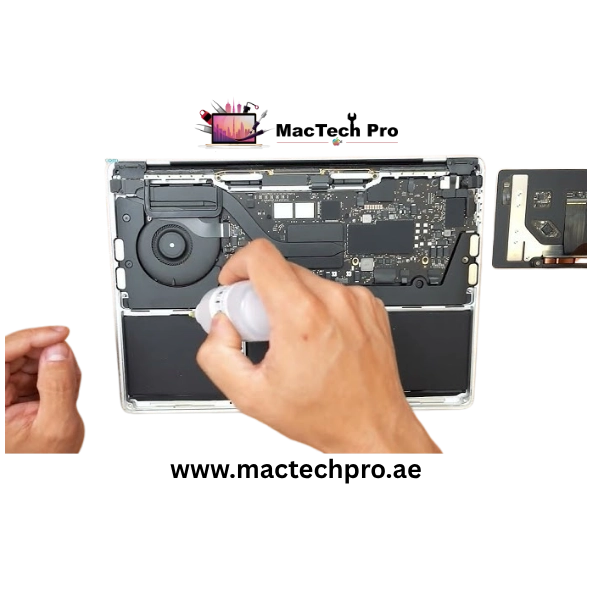
The MacBook Pro M1's A2389 battery is attached to the upper case with stretch-release adhesive strips — just like those on iPhones and iPads. Apple designed these strips so that when pulled gently at a low angle, they stretch and release without leaving any residue. Our technicians are experts at this process. They pull each strip (usually 4–6 strips) slowly and in a controlled manner. If a strip is stubborn, a little isopropyl alcohol can be applied to the edges to release it safely; there is no danger to any surrounding parts.
Once the adhesive is removed, the old A2389 battery is carefully removed. We thoroughly inspect the battery bay area (where the battery resides) to check for electrolyte leakage, corrosion, or damage to surrounding components. If any additional issues are identified, we will let you know before proceeding.
The new Original A2389 battery is applied with fresh adhesive strips and then placed precisely into the battery bay. We first set the battery in place, then press it down so the adhesive adheres evenly across the entire surface and the battery is firmly in place, with no movement.
After the new battery is installed: The trackpad cable is reattached to the ZIF mechanism. The battery connector is reconnected to the logic board. The bottom cover (bottom case) is carefully installed, ensuring all six screws are in place (two long screws near the hinge, four short screws on the sides). We tighten all the screws to the correct torque, enough to secure the cover securely, but not so much that the screw threads are stripped.
After reassembling, we turn on the MacBook Pro M1 and perform a thorough battery test. We check: macOS is correctly recognizing the new battery — New Battery, 0 Cycles, 100% Capacity is displayed. Battery Status is 'Normal'. Charging Behavior — Charging properly with the original charger or USB-C PD charger. The trackpad, keyboard, and all other components are working properly after the repair. Confirming consistent battery behavior by running a short discharge/charge cycle. MacTech Pro won't return your MacBook Pro M1 until all of these checks have passed. And the entire process from delivery to completion of your MacBook takes just 2 to 3 hours.
After Your MacBook Pro M1 Battery Replacement — Tips to Maximize Battery Life
After MacTech Pro replaces your MacBook Pro M1 battery with a new original A2389 cell, adopting proper charging habits and usage patterns can significantly extend the lifespan of your new battery. The following are our expert recommendations:
1. Enable Battery Health Management in macOS
Go to System Settings → Battery → Battery Health → Enable Optimized Battery Charging. This learns your charging routine and reduces time at 100%, significantly extending battery lifespan.
2. Avoid Extreme Temperatures — Especially Important in Dubai
Never leave your MacBook in a hot car or in direct sunlight. Dubai's ambient temperatures can accelerate battery degradation. Always charge in a cool, ventilated space.
3. Avoid Consistently Charging to 100% and Draining to 0%
Keep your battery between 20% and 80% as much as practical for maximum lifespan. Avoid frequent full drain cycles — using 50% today and 50% tomorrow is better than one full 0–100% charge.
4. Keep macOS Updated
Apple regularly improves battery management in macOS updates. Keeping your system updated ensures you benefit from the latest optimizations for the M1 chip's power management.
5. Use Energy Saver Settings Appropriately
Enable Low Power Mode when you don't need full performance. Go to System Settings → Battery → Low Power Mode. This reduces background activity and extends battery life significantly during heavy use days.
6. When to Return for Your Next Battery Replacement
With proper care, your new A2389 battery should perform well for 2–3 years. When macOS shows "Service Recommended" again, or battery life drops noticeably, contact MacTech Pro for your next replacement. Most well-maintained M1 MacBook Pros need a replacement every 3–4 years.
MacBook Pro Battery Replacement Dubai — Complete Keyword Guide
If you're looking for a MacBook Pro M1 (A2338) battery replacement in Dubai, MacTech Pro is the place to be. Here's a one-stop solution for all search terms:
For the best MacBook Pro battery replacement in Dubai — original parts, expert installation, fair prices and genuine warranty — MacTech Pro is the best choice. MacBook Pro M1 A2338 Battery Replacement: Original A2389 Battery, 380 AED, 6 Month Warranty, 2–3 Hours Lead Time, Service Available as well. MacTech Pro: Best MacBook Battery Replacement Service in Dubai.